





Summary:
Filing a GSTR 3B nil return is mandatory for every GST-registered taxpayer who has had no sales, purchases, or tax liability in a given month. Skipping it leads to late fees and compliance issues.
A GSTR-3B nil return must be filed even when a business has zero sales, zero purchases, and zero tax liability for the month — skipping it isn’t optional just because there was nothing to report. Miss the deadline and the penalty applies regardless of the fact that no tax was owed. This guide covers the exact due dates, the late fee math, the step-by-step filing procedure on the GST portal, and the SMS shortcut most taxpayers don’t know exists.
Steps to File NIL GSTR-3B on GST Portal
The following are the steps to file NIL GSTR-3B via GST Portal:
Step 1: Log In to the GST Portal Go to www.gst.gov.in and log in with your GSTIN, username, and password.
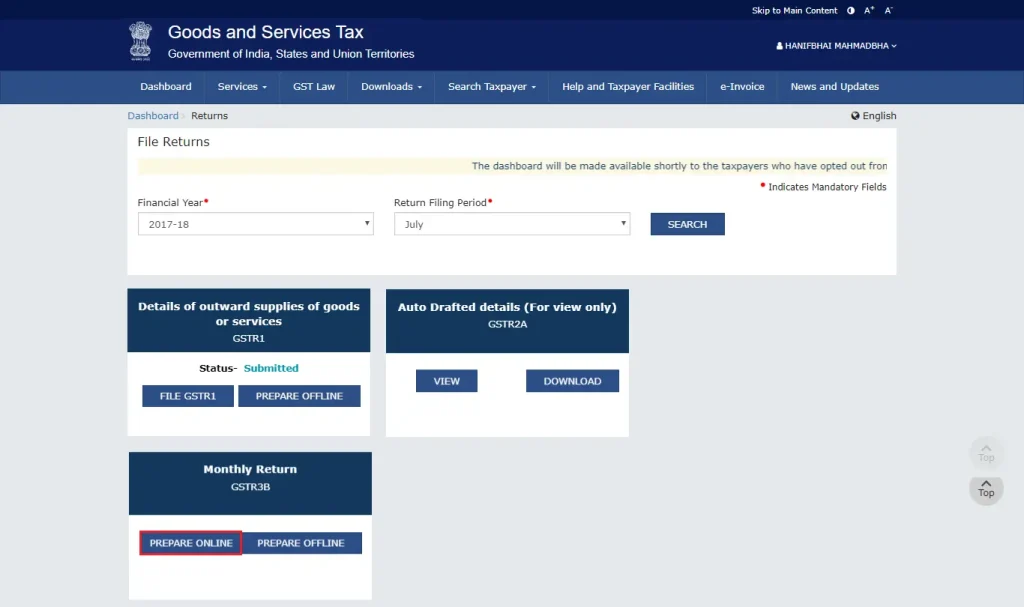
Step 2: Navigate to the Returns Dashboard Go to Services > Returns > Returns Dashboard. Select the financial year and the return period (month) you’re filing for.

Step 3: Select GSTR-3B Click the GSTR-3B tile, then Prepare Online.
Step 4: Confirm All Tables Are Zero Every section should already show zero — don’t manually enter anything:
- Section 3.1 (outward and reverse charge supplies) — zero
- Section 3.2 (inter-state supplies) — zero
- Section 4 (ITC eligibility) — zero
- Section 5 (exempt and nil-rated supplies) — zero
- Section 6 (tax payment) — zero liability
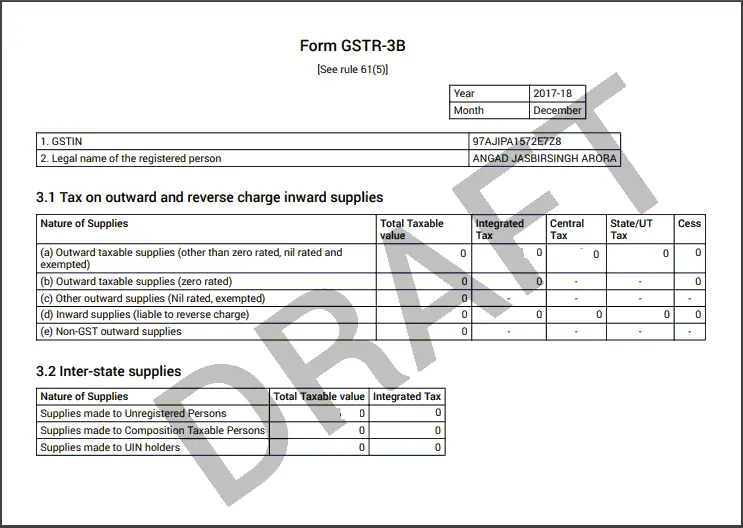
Step 5: Save the Form Click Save GSTR 3B and confirm.
Step 6: File the Return Click Submit, then File GSTR 3B. Verify using either:
- EVC (OTP to your registered mobile), or
- DSC (Digital Signature Certificate — required for companies and LLPs)

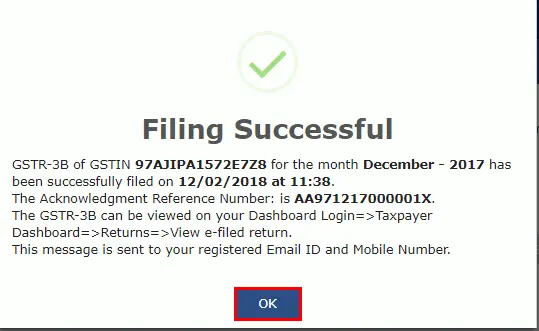
Step 7: Save the Acknowledgment Filing generates an ARN (Application Reference Number). Download and keep this — it’s your proof of compliance if the department ever questions a filing gap.
Filing manually every month is where most errors creep in — a missed field or wrong period selection is enough to trigger a rejection. Munim GST automates the nil-check and files directly, so there’s nothing to double-check by hand.
Check out how to file NIL GSTR-3B with Munim GST.
How to File GSTR-3B Nil Return via SMS
For businesses that genuinely had zero activity, GSTN built a filing path that skips the portal entirely:
SMS NIL 3B [GSTIN] [Tax Period in MMYYYY] to 14409 Example: NIL 3B 24AAAAA0000A1Z5 012025 for January 2025
- You’ll get an OTP by SMS
- Reply CNF 3B [OTP] to confirm
- An ARN comes back by SMS — that’s your filing confirmation
No login, no internet connection required — this works from any phone that can send a text. It’s the fastest legitimate way to clear a nil month, and it’s worth setting a monthly reminder for if a business has recurring inactive periods. The same nil-filing logic applies to GSTR-1 nil returns if you also need to clear that filing for the period.
What is the Due Date for Filing GSTR 3B?
The due date is the 20th of the following month for regular taxpayers with annual turnover above ₹5 crore. Businesses under the GST registration turnover limit of ₹5 crore get a few extra days, split by state category:
| Annual Turnover | Due Date |
| More than ₹5 crore | 20th of the following month |
| Up to ₹5 crore (Category I states) | 22nd of the following month |
| Up to ₹5 crore (Category II states) | 24th of the following month |
Check the full GST state code list to confirm which category your state falls under, or see the GST filing due dates calendar for all return deadlines at a glance.
Example: a nil return for January is due 20th February for a turnover-above-₹5-crore business, or 22nd/24th February for smaller businesses depending on state.
What is the Late Fees for GSTR-3B NIL Return
- ₹20 per day (₹10 CGST + ₹10 SGST) for every day past the due date
- Capped at a maximum of ₹500 (₹250 CGST + ₹250 SGST) per return period
For the full breakdown of how late fees and interest are calculated across all GST returns (not just nil ones), see this GST late fees and interest guide.
Disclaimer: "This blog post is for informational purposes only. For specific tax advice related to your business, please consult a qualified Chartered Accountant or GST practitioner."
About the author


Mehul is a seasoned content writer with a passion for simplifying complex accounting and GST topics. With a keen interest in entrepreneurship and business management, he specializes in creating informative and engaging content for themunim.com. His goal is to help businesses understand and implement accounting and GST software solutions effectively. When he's not crafting content, Mehul enjoys exploring new places and spending time with his Golden Retriever.
Related Articles
Explore the latest market news, useful resources for business, and Munim updates.