
User Access Control Software for Secure Financial Data Management
Not everyone from your accounting should have access to all the financial data of your company. Restrict their access with Munim.
How Does User Access Control Work in Munim Accounting Software?
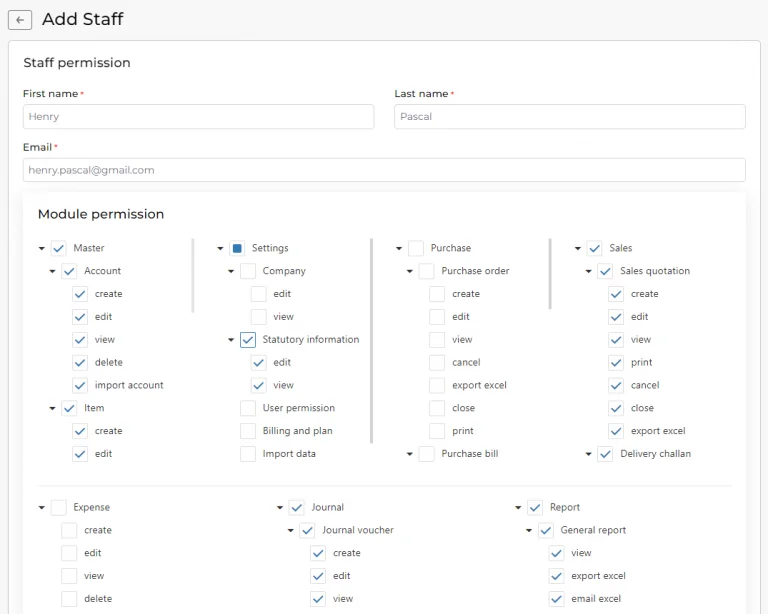
Being CFO, CA, or accountant you might have experience working with a variety of accounting software but we can assure you that none would be as simplified as Munim. It not only caters to your accounting needs but also other organizational requirements such as access control. With user access control features you can allow access to the software as per their roles in the organization. Let’s see further how this feature helps you.
What User Access Control Features Does Munim Offer?
Know the qualities of user control feature and how it can help you assigning roles:
Edit/Delete Entries
In Munim if you provide access to your accounting application to employees of some other department or within the same department you can restrict them from editing and/or deleting entries.
Share Viewing Rights
When you hire a trainee you cannot directly allow them to make entries so for training purposes share viewing rights with them and let them observe how it is done.
Control Access To Modules
The procurement department requires access to the Purchase module only as they have nothing to do with either accounting or GST. While sharing, restrict them from accessing other modules.

Restrict Printing
In Mumin you can restrict junior accountants from printing invoices, sales return receipts, delivery challan, and purchase orders because every document should be processed after confirming with the head accountant.
Allow Bulk Invoice Generation
With the bulk invoice feature, the sales team can multiple invoices at once. You never know when your sales hit the sky so it is best to provide access to this feature beforehand to cater to overwhelming demand.
Authorize Downloading Of Reports
Allow downloading of reports to the executives of respective departments so that they can analyze their performance in an unrestrictive environment. In Munim, one can download reports in excel and PDF format.
Take Control of User Access and Permissions with Munim
You will get full access to all the features for a limited period.
What Are the Benefits of User Access Control Software?
Find the benefits of utilizing user access control feature in Munim:

Transfer Ownership Easily
Oftentimes owners of the company are preoccupied; they don’t have time to grant access to the team upon request. In that case, they can transfer full authority to the assigned person to do the needful.

Simplifies Delegation Of Responsibilities
Munim aids in the delegation of responsibilities of the accounting team. As per their role, the head of the accounting team/owner can allow them to access respective modules.

Boosts Productivity
In Munim a full-fledged accounting team can work together without interfering with each other’s tasks. Due to the high level of collaboration, productivity improves.

Access To Activity Log
In Munim you can see what actions were taken by your teammates, allowing you to backtrack the undesired activity. The best thing is that the activity log also gives you the date and exact timing.

Authorize Access In Real Time
To share access to Munim with your teammates, doesn’t take hours. Once you add the required information and specify the modules to share access, it gets processed within seconds.

Revoke Access
An authorized executive can revoke access to any team member within split seconds. This is important when an employee resigns and you don’t want them to access your company data.
Why Choose Munim for User Access Control?
Munim is the most advanced cloud-based accounting software in India. We have endeavored to help businesses with their various needs regarding GST compliance, inventory management, e-invoices, e-way bills, user access control, and accounting as well. We ensure that you won’t find any app that competes with us. Try Mumin and experience its usefulness for yourself.

Frequently Asked Questions
These are the most commonly asked questions about Munim Products. Can’t find what you’re looking for?
Chat to our expert team!
What is user access control software?
Why is user access control important for business accounting data?
What is the principle of least privilege in user access control?
What user access control settings can I configure in Munim?
Can I restrict a staff member to only specific accounting modules?
How do I add a staff member and assign permissions in Munim?
Can I restrict staff from printing or exporting financial data?
Can I prevent a staff member from recording backdated entries?
Does the accounting software keep an activity log of user actions?
Can I set different permissions for different staff members?
Can I revoke a staff member’s access when an employee leaves?
Can I give my CA or accountant their own login instead of sharing my credentials?
Can a CA or accountant work with user access control for multiple companies?
Can I transfer ownership of a company account to another user?
Does Munim support two-factor authentication at sign-in?
Is user access control included with the billing & accounting software?
Explore More Accounting and Business Management Features
The following are the benefits of cloud accounting software for small and medium-scale businesses in India:

Stay on top of your GST obligations with regular updates and notifications with the best accounting software.

Say goodbye to spreadsheets! Automatically track your finances with ease. Save time and focus on what matters most – growing your business.
Generate compliant e-invoices instantly and say goodbye to paper clutter. Streamline your e-invoicing workflow and save time.