
Document Flow
Track applicable stages and keep the current stage highlighted while completed stages stay available in the case record.

Fetch notices and orders from the GST Portal, monitor due dates, download documents, and maintain the case history from the first notice to final disposal.
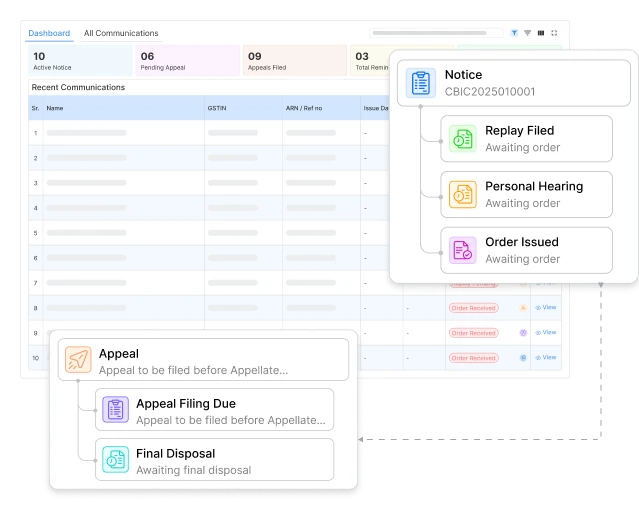
A missed notice or due date can delay the response and increase compliance risk. Munim GST brings portfolio-level
counts and recent notices together. It helps your team identify cases that require attention.
 Active Notices
Open notices across clients that still require tracking or action.
 Pending Appeal Filing
Orders marked for appeal where filing has not yet been recorded.
 Appeals Filed
Appeals already recorded against the relevant orders.
 Total Reminder Notices
Reminder notices received from the department against replies not yet recorded.
 Closed Notices
Completed or internally closed cases retained for future reference.
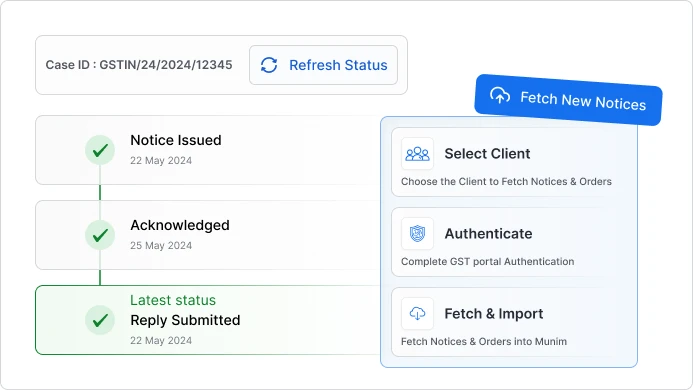
Select a client, authenticate when prompted and fetch available notices and orders into Munim GST. Refresh an existing case anytime to retrieve updated status information.

Fetch New Notice: Select the client and complete the applicable GST portal authentication to fetch notices and orders without switching applications.

Refresh Latest Status: Refresh an existing case to retrieve updated status information or newly available documents
Use one register to check notices fetched or recorded across clients. Filter records by client,
GSTIN, period, section, status, authority or reference number.

Show-cause notices, DRC-01 summaries, and other communications along with their section, period, issue date and due date against each client.

Replies recorded against each notice, with annexures and supporting documents kept in the same case record.

Orders issued on a case, with the order date and the order document available to download.

Keep available rejection orders with the related case and download a copy whenever it is required.

Department intimations and reminder notices tracked as separate documents on the same case.

Find any notice by GSTIN, PAN, client name, ARN or reference number.
From return-related notices and registration issues to audits, demands and appeals, organise different GST
communications by client, GSTIN, proceeding, due date and case status.
01
Track communications related to non-filing, delayed filing, or return discrepancies, along with due dates, replies, and supporting documents.
Keep show-cause notices, DRC summaries, demand orders, payment records, and available recovery communications together under the relevant case.
02
03
Organise assessment notices, audit notices and reports, reminders, hearing records, replies, and documents submitted during the proceeding.
Track clarification, suspension, cancellation, and other registration-related communications, along with replies and resulting orders.
04
05
Maintain refund notices, replies, supporting documents, and available sanction or rejection orders against the relevant application or case.
Record orders selected for appeal, filing due dates, appeal documents, remand communications, outcomes, and final disposal details.
06
Click on ‘Notice & Orders’ and choose ‘Dashboard’ for the portfolio view or ‘All Communications’ for the full register
›Select a client, complete portal authentication when prompted and fetch notices and orders from the portal.
›Open any communication to view its document flow, timeline, due dates and attached files.
›Add replies, hearings, orders, appeals, notes and reminders, then download the documents required for the case.
Use the GST reconciliation feature to match purchase, sales, and ITC data at the invoice level, compare returns, and identify mismatches with clear reporting.
Track applicable stages and keep the current stage highlighted while completed stages stay available in the case record.
Record each event with its date, its documents and the officer or authority involved, including hearing numbers and multiple rounds of hearing replies.
Record whether an order went against the client or was partly in their favour, add the appeal, and keep the appeal filing due date in view.
Add a note against any notice, reply, order or reminder, attach the files that belong with it, and keep the working context with the case instead of in a separate sheet.


GST notice and order management software centralises notices, replies, hearings, orders, reminders, and appeals across multiple GSTINs. It connects every communication to its case, helping teams track due dates, documents, and the current stage from one place.
Join thousands of satisfied users and experience the difference.
Talk To Sales or Support