What is the ICEGATE Bill of Entry Status?
 AuthorMehul Jagwani
 Reviewed ByCA Ajay Savani


- What is ICEGATE? Understanding the ICEGATE Full Form
- What is a Bill of Entry and why does it matter?
- How to Check ICEGATE Bill of Entry Status and Download (Updated 2026 Process)
- Who Needs ICEGATE Registration?
- Common Problems People Face on ICEGATE and How to Fix Them
- Conclusion
- Frequently Asked Questions on ICEGATE
Have you ever sent a shipment abroad or received goods from another country and had absolutely no idea where your paperwork was stuck? Most Indian importers and exporters know that feeling very well. The goods are at the port. The shipping agent is calling. And nobody seems to have a clear answer about what is happening with the documents.
That is exactly the kind of problem the ICEGATE portal was built to solve.
From understanding the ICEGATE to checking the ICEGATE bill of entry status, tracking the shipping bill status on ICEGATE, and even figuring out how to download a shipping bill from ICEGATE, this guide covers it all.
What is ICEGATE? Understanding the ICEGATE Full Form
The ICEGATE full form is Indian Customs Electronic Gateway. That is quite difficult to remember, which is probably why most people just call it ICEGATE.
In simple terms, ICEGATE is an online portal run by the Central Board of Indirect Taxes and Customs (CBIC), which is the government body that oversees customs in India. The ICEGATE portal acts as the main digital bridge between the customs department and all the traders, shipping agents, freight forwarders, customs brokers, and port operators involved in India's import and export ecosystem.
Today, the ICEGATE portal handles millions of transactions every month. It covers everything from filing bills of entry for imports to processing shipping bills for exports, paying customs duties, tracking cargo, and much more.
What is a Bill of Entry and why does it matter?
Before diving into how to check the ICEGATE bill of entry status, it is worth understanding what a bill of entry actually is.
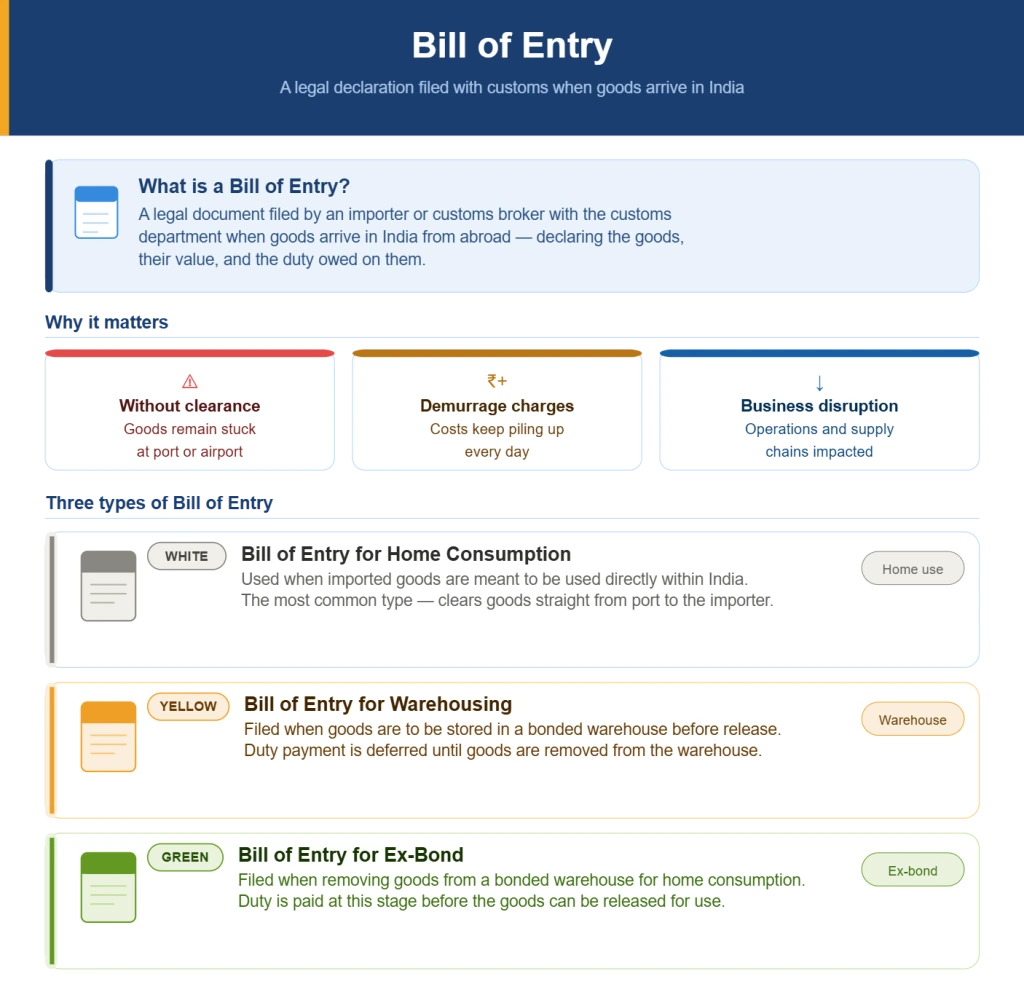
A Bill of Entry is a legal document that an importer or their customs broker files with the customs department when goods arrive in India from another country. It is basically a declaration that says, "These goods have arrived; here is what they are, here is their value, and here is the duty we owe on them."
Without a properly filed and cleared Bill of Entry, the goods cannot leave the port or airport. They stay stuck. Demurrage charges keep piling up. And the business suffers.
There are three types of Bills of Entry:
- Bill of Entry for Home Consumption (White): When imported goods are meant to be used directly in India.
- Bill of Entry for Warehousing (Yellow): When the goods are to be stored in a bonded warehouse before being released.
- Bill of Entry for Ex-Bond (Green): When goods are being removed from the bonded warehouse for home consumption.
How to Check ICEGATE Bill of Entry Status and Download (Updated 2026 Process)
Here is the process of checking ICEGATE Bill of Entry Status in 2026:
Step 1: Go to the Official ICEGATE Portal and Log In
Visit www.icegate.gov.in and log in using registered ICEGATE credentials, the username and password created during ICEGATE registration.
Step 2: Navigate to the Document Status Page
Once logged in, there are two ways to get to the right page:
From the portal dashboard, go to Services → Document Status → Bill of Entry
Step 3: Enter the Required Bill of Entry Details
Once on the status page, the following details need to be filled in:
Bill of Entry Number: The unique number assigned when the Bill of Entry was filed
Bill of Entry Date: The exact date of filing in DD/MM/YYYY format
Port Code: The code for the port or customs station where the goods arrived
Step 4: Click Search and Read the Status
After entering the details and clicking Search, the portal will display the current status of the Bill of Entry. Here is what the different statuses mean:
Filed: The document has been submitted but not yet picked up for processing
Assessed: The customs officer has reviewed and calculated the applicable duties
Duty Paid: The customs duty has been paid by the importer
Out of Charge (OOC): The goods are fully cleared and can be removed from the port; this is the status every importer is waiting for
Query Raised / Detained: There is an issue or pending question from the customs officer that needs to be addressed
Step 5: Download or Print the Status for Records
For record-keeping, the BOE status report can be downloaded or printed directly from the portal. This comes in handy for banking compliance, GST input tax credit claims, and internal audit purposes.
Who Needs ICEGATE Registration?
- Importers and exporters who want to file customs documents directly.
- Customs brokers (also called CHAs or Custom House Agents) who file documents on behalf of their clients.
- Shipping lines and airlines.
- Port operators and inland container depots.
- Government agencies involved in trade facilitation.
Common Problems People Face on ICEGATE and How to Fix Them
It would not be fair to only talk about how smooth everything is without acknowledging that the ICEGATE portal, like any government platform, does have its share of hiccups. Here are some common issues and quick fixes:
Problem 1: Cannot find the Bill of Entry status
Solution: This usually happens when the wrong IEC or Bill of Entry number is entered. Double-check the details with the customs broker. Also, newly filed Bills of Entry can take a few hours to reflect on the portal.
Problem 2: ICEGATE registration is taking too long
Solution: Sometimes the registration approval gets delayed if the documents uploaded are not clear or if the IEC is not yet linked to the CBIC database. Make sure the IEC is updated and the documents are legible.
Problem 3: Shipping Bill not showing in the portal
Solution: If the shipping line has not filed the EGM yet, the shipping bill may show as "Pending EGM." This is not an error in the filing. The exporter needs to follow up with the shipping company.
Problem 4: Login credentials not working
Solution: In case of forgotten passwords or locked accounts, the ICEGATE portal has a self-service password reset option. Use the registered email ID or mobile number to reset access.
Conclusion
Customs can feel overwhelming. There is a lot of paperwork, a lot of codes, and a lot of moving parts. But the ICEGATE portal has made things significantly more accessible for Indian traders in recent years. The fact that anyone can check the ICEGATE bill of entry status or the shipping bill status on ICEGATE in a matter of minutes, from a mobile phone or a laptop, without stepping out of the office, is genuinely useful.
For those who are new to international trade, start with understanding the basics: what a bill of entry is, why the shipping bill matters, and how the ICEGATE portal connects it all. For those who are already trading, it might be time to explore whether the ICEGATE registration is set up properly and whether all the features of the portal are being used effectively.
If this guide was helpful, share it with someone in your network who deals with imports or exports.
Frequently Asked Questions on ICEGATE
1. What is the ICEGATE full form?
ICEGATE stands for Indian Customs Electronic Gateway. It is managed by CBIC.
2. Is ICEGATE registration free?
Yes, registration on the ICEGATE portal is completely free of charge.
3. How long does it take for the Bill of Entry status to update on ICEGATE?
In most cases, the status updates within a few hours of any action being taken by the customs officer. For urgent matters, it is best to follow up with the customs broker or the port directly.
4. What is the difference between a Bill of Entry and a Shipping Bill?
A bill of entry is filed for imports. A shipping bill is filed for exports. Both are key customs documents but serve opposite purposes.
5. How to download shipping bills from ICEGATE?
Log in to the ICEGATE portal, go to the document download section, enter the shipping bill number and details, and save the PDF. The downloaded copy is digitally signed and officially valid.
Disclaimer: "This blog post is for informational purposes only. For specific tax advice related to your business, please consult a qualified Chartered Accountant or GST practitioner."
About the author
Related Articles
Explore the latest market news, useful resources for business, and Munim updates.