
JOB WORK MANAGEMENT
Track Every Job Worker’s
Material in Munim Billing & Accounting
Send raw material to job workers and know exactly what comes back. Munim Billing & Accounting records every DC Out, DC In, consumption and wastage in one place. Built for manufacturers who outsource dyeing, printing, polishing, making or testing work.
- Job Work DC Out & DC In
- Manage Consumption
- Job Cost Calculator
- Pending RM & FG Registers
- ITC-04 Statement

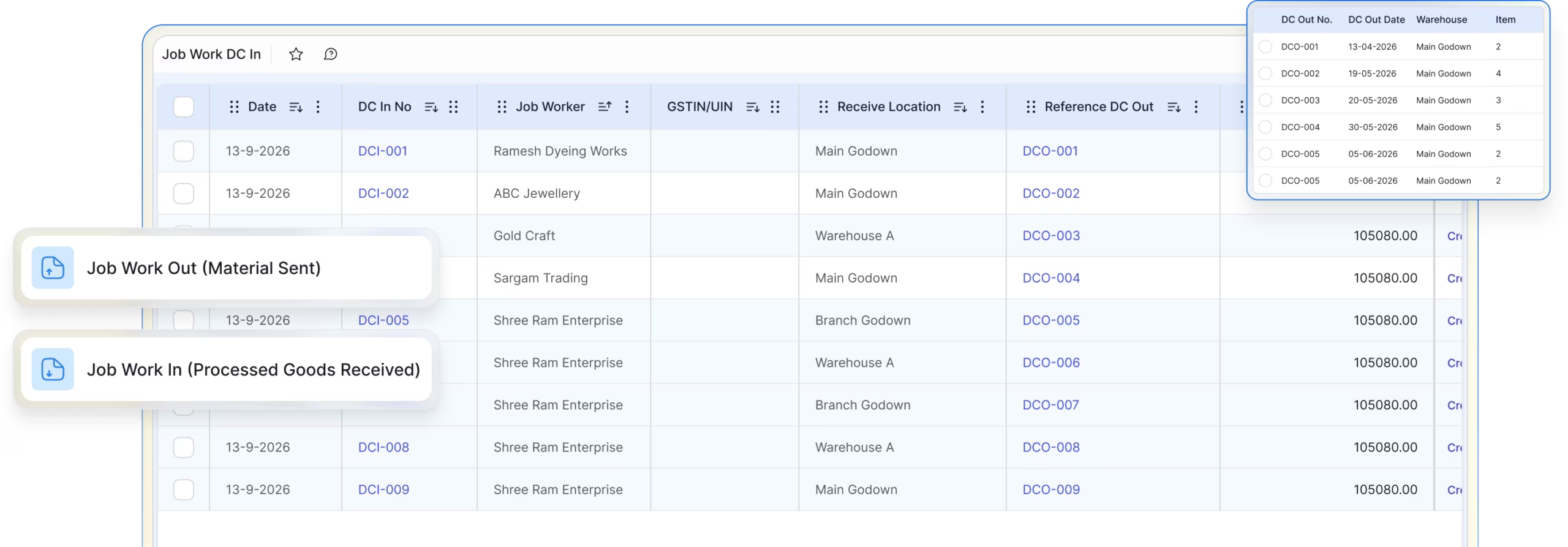
What Does Job Work Management Software Do in Munim?
Job work management software tracks raw material a manufacturer sends to job workers and what returns. As the principal, you keep ownership of the material and the finished goods throughout. Munim Billing & Accounting keeps these records in the same app as your inventory.

DC Out
Send raw material to a job worker on a numbered challan you can print.

DC In
Receive finished goods, rejections and scrap against the original DC Out, in parts.

Manage Consumption
Raw material needs for each finished item are saved once in the item master.

Wastage Tracking
Consumed, returned and lost quantities are entered for every raw material.

Job Cost Calculator
A built-in calculator rolls material, wastage and other expenses into a unit cost.

Six Reports
Registers, pending lists, statutory due dates and ITC-04 come from the same entries.
THREE STEPS
Set Up Job Work in Munim Billing & Accounting in 3 Steps
Job Work is switched on from settings, so it never clutters accounts that do not outsource. Once it is on, three quick steps prepare your items and job workers.
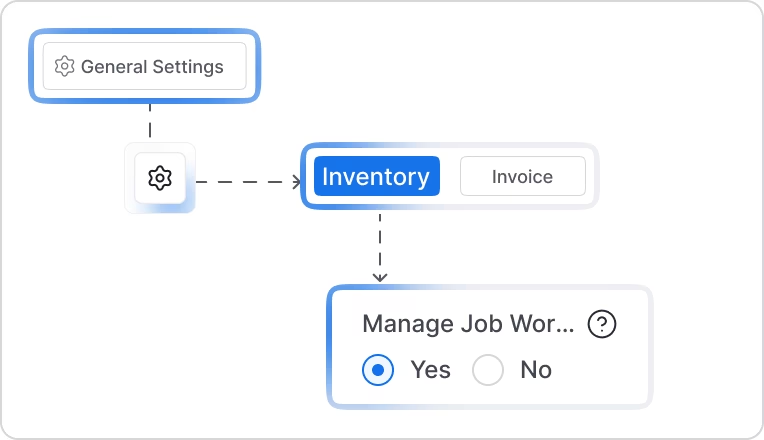
Turn on Job Work
In General Settings, set Manage Job Work to Yes. Turn Consumption on as well if you track raw material per item.
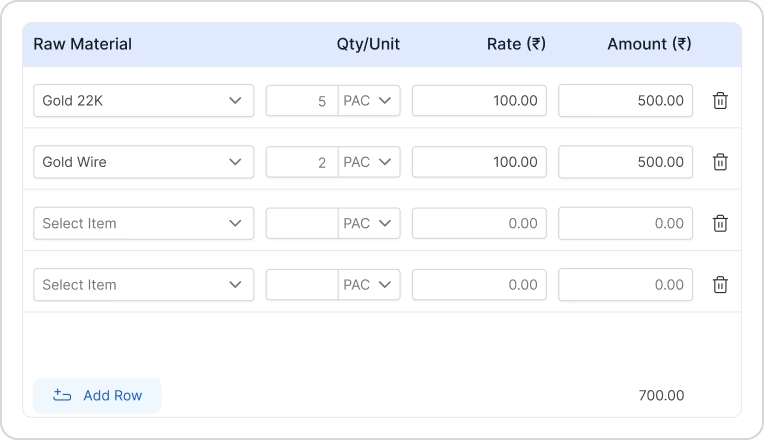
Manage consumption on items
Items now show a Manage Consumption option for listing raw materials per finished unit. For example: A jeweller can list 22K gold and making charges against a chain.
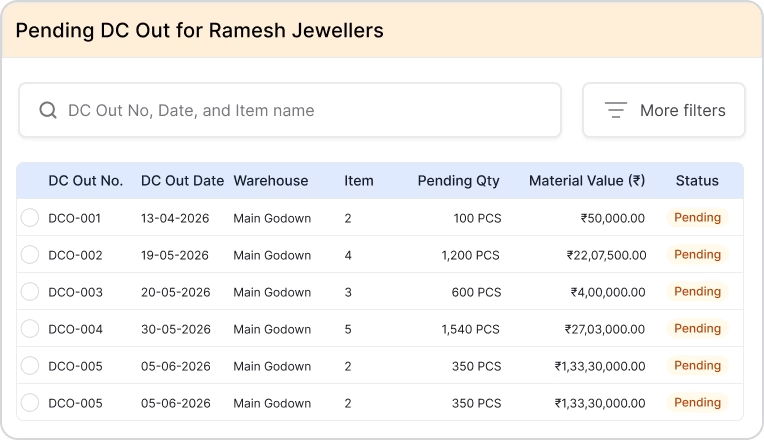
Set up job workers
Existing job workers appear on the DC Out once they are saved as vendors. New ones can also be created directly from the DC Out.
Book a Job Work Walkthrough With Our Team
Book a demo and walk through a DC Out using your own items and job workers. You will see pending quantity, wastage and cost per unit before deciding.
DC OUT
Every Dispatch to a Job Worker, Recorded on One DC Out
The rules for job work under GST say goods move on a delivery challan, not an invoice. In Munim Billing & Accounting, the job work delivery challan is called a DC Out. It records what left, where it went and what you expect back.


Job worker and process
Pick an existing job worker from your vendors, or create a new one on the DC Out. Tag the process type for each job as you go.

Virtual warehouse
Each DC Out works like a virtual warehouse, holding material you still own while it is away.

Expected finished goods
List the items you expect back, with quantity and a short instruction for each.

Raw material sent out
Enter quantity, rate, batch, lot or serial number, and manufacturing or expiry dates.

Delivery challan and e-way bill
Print the DC Out as your delivery challan, add transporter details, and generate the e-way bill.

Close or delete
Convert a DC Out to a DC In, or close it manually when the job ends. Deletion is allowed only until its e-way bill is generated.

Pending DC Outs
Select a job worker to see their pending DC Outs with quantity and material value. Add one or more of them to the same DC In.

Three output types
Finished goods must match items you listed as expected on the DC Out. Rejected goods and scrap use items you create separately in the item master.

Partial deliveries
Expected, already received and pending quantity show on every line of the DC In.

Consumption and wastage
For each raw material, enter the quantity consumed, returned and lost to wastage.

Cost per finished unit
Open the calculator inside the cost field to total material, wastage and other expenses. Munim uses this figure as the purchase price of the finished item.

Service charges and payment
Add packing, processing or labour charges, with GST calculated on each line. Record the payment to the job worker directly from the DC In list.
DC IN
Receive Finished Goods, Rejections, and Scrap on a DC In
Job workers rarely return everything at once, or in perfect condition. A DC In in Munim Billing & Accounting records each return against its DC Out. Partial returns, rejected pieces, scrap and wastage all stay visible.

Know What Is Still Out and When It Must Return
Every DC Out and DC In feeds six reports, so nothing is compiled by hand. The two ITC statements sit under GST Compliance, the rest under Reports.
01
Jobwork Register
Lists every DC Out and DC In line with quantity issued, received, rejected and lost.
Jobwork Summary Report
Shows each DC Out with its statutory due date, days remaining and return status.
02
03
Pending RM Register
Tracks raw material still with job workers against the compliance date, with an alert status.
Pending FG Register
Compares expected finished goods with quantity received and rejected, so pending output is clear.
04
05
ITC-04 Statement
Lays out each challan with job worker GSTIN, HSN, quantity, taxable value and type of goods.
ITC-5A Statement
Lists goods received back on each DC In against its DC Out, with losses and waste.
06
Frequently Asked Questions
Who is a job worker, and does a job worker need GST registration?
A job worker is anyone who processes or treats goods that belong to a registered person, known as the principal. The job worker needs GST registration only when its all-India aggregate turnover crosses the threshold, which is ₹20 lakh in most states. This applies even when the principal is located in another state.