
How to File GSTR-1 When You Have Hundreds or Thousands of Sales Invoices
 AuthorMehul Jagwani
 Reviewed ByMadhav Bhayani




Imagine it is the end of the month and your sales register has crossed 2,000 invoices. Most entries look fine, but a few GSTINs need checking, some credit notes were added late and a handful of invoices may have the wrong place of supply.
At this stage, understanding how to file GSTR-1 is not really about entering invoices one by one. It is about making sure your sales data is clean before it reaches the return.
That is where our Munim GST workflow can help. We help you bring your sales data into one process, validate important GST details, review invoices, upload the prepared data to GSTN and reconcile the final GSTR-1 summary before filing.
As your invoice volume grows, these checks become even more important because a small error repeated across hundreds of records can quickly become a bigger filing problem.
Why Does GSTR-1 Get Harder With More Invoices?
GST rules do not change because you have 100 invoices instead of 5,000.
The risk of errors does.
Imagine closing the month with 1,800 invoices. Most records are correct, but a few GSTINs are wrong, two invoice numbers are duplicated, three credit notes were entered late and some interstate transactions have an incorrect place of supply.
Your total sales figure may still look right.
However, each of these errors can affect your GSTR-1.
That is why, when you need to file GSTR-1 with bulk data, it is better to identify exceptions than manually check every invoice.
How We Help You Handle Bulk GSTR-1 Filing
With Munim GST, we follow a structured GSTR-1 workflow:
Prepare → Verify → Upload → File
Instead of asking you to enter every invoice manually, our workflow helps you import your sales data, verify records, push prepared data to GSTN and review your return before filing.
1. Prepare
You can start the GSTR-1 process from:
My Clients → Return → GSTR-1 or GSTR-1/IFF
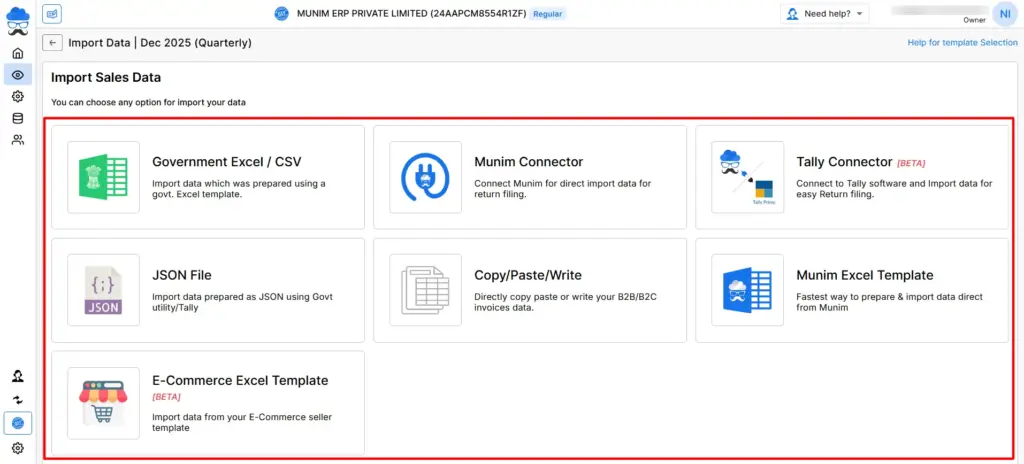
On the Data Prepare screen, you can add an individual invoice or select Import Your Data for bulk records.
We support multiple import methods in Munim GST, including:
- Government Excel or CSV
- JSON
- Munim Excel Template
- Copy and paste
- Munim Connector
- Tally Connector
- E-commerce Excel Template
During import, our workflow helps you identify issues such as incorrect tax rates, invalid GSTINs, duplicate records and HSN related errors.
Designed for Modern Tax Professionals
A premium filing solution for CAs and tax consultants who need speed, scale, and operational clarity.
 Handle multiple clients with ease
- Reconcile and validate with confidence
- Overcome the limitations of the GST portal
 Handle multiple clients with ease
Already Using Munim Billing & Accounting?
If you already use Munim Billing & Accounting, you can use Munim Connector to bring applicable accounting data into your GST return preparation workflow.
This can reduce your dependency on maintaining a separate sales Excel file every month.
2. Verify
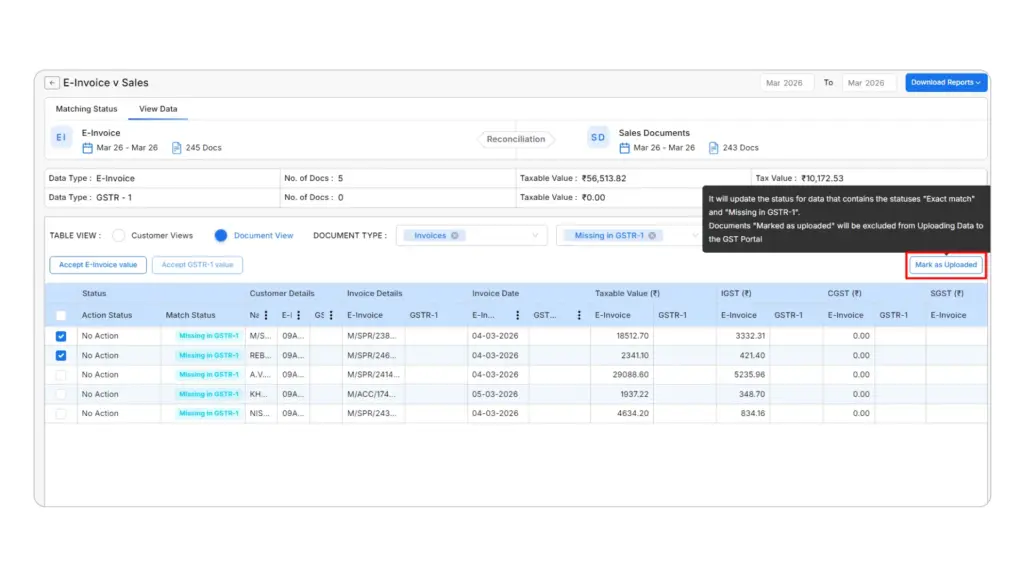
Your next step is Check Invoices.
Here, you can review prepared records across categories such as:
- Invoices
- B2C
- Credit and debit notes
- Advance receipts
- Exports
You can check important information and correct records before sending them to GSTN.
If you are handling thousands of invoices, this lets you focus on records that actually need attention instead of checking every correct invoice again.
3. Upload
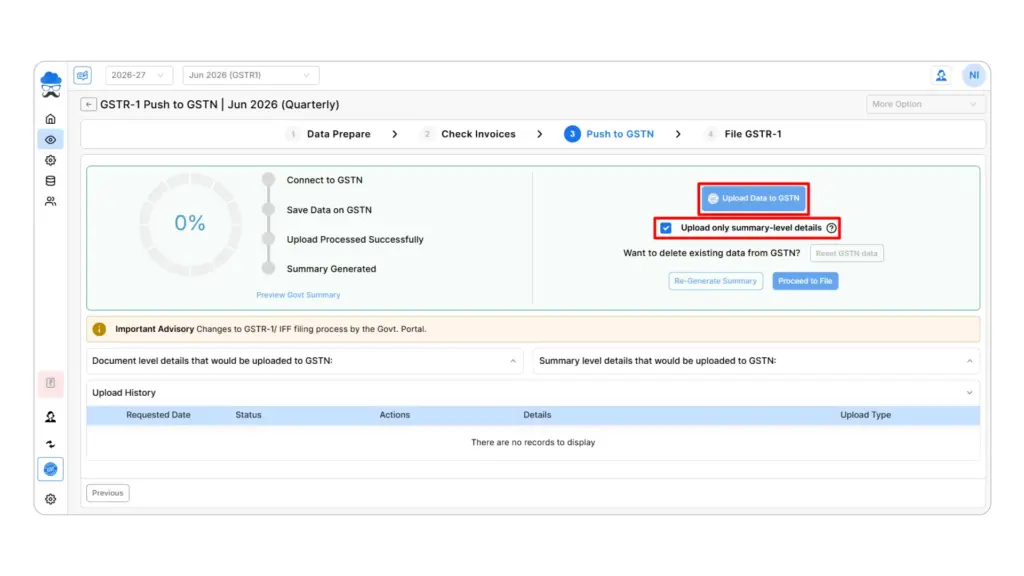
Once you have checked your data, you can push it to GSTN.
If GSTN returns an error, you can review the affected records through our upload and error report workflow rather than rebuilding the complete return.
Want to see this on your own data?
Try Munim GST free.
4. File
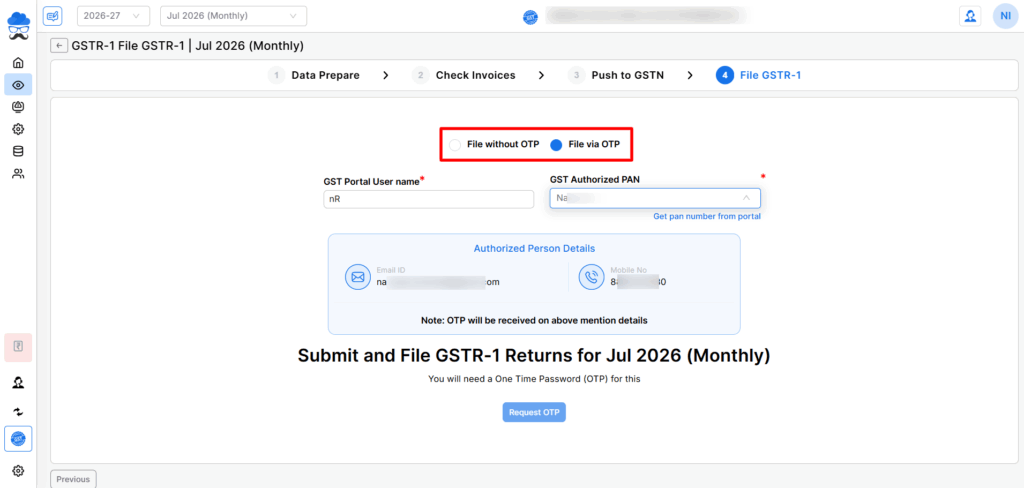
After your data is uploaded, review the final GSTR-1 summary against your books before filing.
This is an important final check, especially when you have thousands of invoices. It lets you compare your consolidated GSTR-1 figures with your sales records before completing the return.
Why Munim GST’s Workflow Stands Out for Bulk GSTR-1 Filing
When you are dealing with hundreds or thousands of invoices, the real challenge is not just uploading data. It is making sure the right data reaches GSTN in the right format.
That is where our “Prepare → Verify → Upload → File” workflow helps.
With Munim GST, we help you:
- Import bulk sales data instead of entering invoices one by one.
- Catch common errors early, including duplicate records, GSTIN issues, tax rate mismatches and HSN related errors.
- Review invoices before GSTN upload, so corrections can be made at the verification stage.
- Handle GSTN errors separately instead of rebuilding the complete return.
- Reconcile GSTR-1 with e-invoice data where applicable.
- Bring Munim Billing & Accounting data into GST preparation through Munim Connector.
For high volume businesses, this makes the filing process easier to control. Instead of moving back and forth between spreadsheets, invoice records and portal errors, you can follow one clear workflow from preparation to filing.
That is why we built Munim GST around one simple idea: prepare the data properly first, verify what needs attention, and only then move it to GSTN.
Already Using Munim? Check This Before Your Next GSTR-1
If you already use Munim GST, start from:
My Clients → Return → GSTR-1 → Data Prepare
Before importing another sales file, check whether data for the return period is already available.
Next, go to Check Invoices to review pending or incorrect records before uploading them to GSTN.
Where applicable, you can also review GSTR-1 vs E-Invoice reconciliation before pushing additional records.
And if you already maintain your transactions in Munim Billing & Accounting, check whether Munim Connector can reduce part of your monthly Excel based preparation work.
From Thousands of Invoices to One GSTR-1
Handling thousands of sales invoices does not mean you need to check every record manually. With clean data, bulk imports, timely validation and final reconciliation, you can make GSTR-1 filing much easier to manage.
With Munim GST, we bring the process together through our Prepare → Verify → Upload → File workflow.
Managing large GSTR-1 files every month? Let us help you simplify the process. Import your sales data, verify invoices and prepare your return with Munim GST. Start your free trial today.
FAQs on Filing GSTR-1 With Bulk Sales Data
Can you upload thousands of invoices in GSTR-1?
Yes. You can prepare GSTR-1 using offline tools or supported GST software instead of manually entering every invoice. Make sure you validate your data before upload and reconcile it before filing.
What is the best way to file GSTR-1 with bulk data?
Start by finalising your sales register and classifying your transactions. Then validate key GST fields, import the data in bulk and reconcile your return summary with your books before filing.
Can you use Excel for bulk GSTR-1 preparation?
Yes. You can use Excel or CSV based workflows for bulk data preparation. In Munim GST, we also support Government Excel or CSV, Munim Excel templates and other import methods.
How can you import bulk invoices if you already use Munim?
Go to My Clients → Return → GSTR-1 → Data Prepare → Import Your Data and select the appropriate import method.
What should you check immediately before filing?
Compare your final return with your sales register. Pay particular attention to invoice count, taxable value, tax amount, B2B data, B2C totals, credit notes, HSN details and e-invoice records.
Disclaimer: "This blog post is for informational purposes only. For specific tax advice related to your business, please consult a qualified Chartered Accountant or GST practitioner."
Post Tags
Related Articles
Explore the latest market news, useful resources for business, and Munim updates.