Daily Sales Reconciliation for Retail Stores: Close the Day Without Guesswork
 AuthorMehul Jagwani
 Reviewed ByAjay Savani




Summary:
Daily sales reconciliation means matching your billed sales with cash, UPI, cards, bank transfers, credit sales and stock movement. The objective is not to force every number to match. It is to understand why a difference exists and record it correctly.
You are closing your store for the day.
Your sales report shows ₹85,000, the cash drawer looks correct, but the UPI total is short by ₹1,500. Was a payment missed?
Is the transaction still unsettled?
Or was the wrong payment mode selected while billing?
This is exactly where daily sales reconciliation helps.
If you run a retail store, supermarket, pharmacy, clothing shop, electronics store or any business handling multiple transactions every day, you need a simple way to check whether your invoices, collections, bank receipts and stock movement make sense together.
We recommend doing this while the day’s transactions are still fresh, rather than trying to trace small differences at month end.
What Should You Match During Daily Sales Reconciliation?
A practical retail sales reconciliation process covers four areas:
| Area | What to check |
| Sales | Invoices, returns, discounts and cancellations |
| Payments | Cash, UPI, cards, bank transfers and credit sales |
| Bank | Settled, pending and unmatched transactions |
| Stock | Goods sold, returned, transferred or adjusted |
These figures will not always match on the same day.
For example, a customer may buy on credit, or a successful UPI payment may settle into your bank later. Your goal is not to force the numbers to match. You need to understand and record the reason for the difference.
Simplify Your Business Operations
Designed to give you speed, control, and accuracy in daily accounting tasks.
 Save time with automated accounting workflows
- Get 35+ detailed business reports easily
- Access your business anytime, anywhere
 Save time with automated accounting workflows
How Can You Do Daily Sales Reconciliation in Munim Billing & Accounting?
We have kept the process simple so you can record the payment correctly when you create the invoice and review collections later by payment mode.
If you already use Munim, you can make this part of your daily closing routine. If you are evaluating Munim Billing & Accounting for your retail business, this workflow also shows how your billing and payment records can be organised for easier reconciliation.
Step 1: Tick Payment Received While Creating the Invoice
When you create a sales invoice and the customer pays immediately, tick the Payment Received option.
This links the payment to the invoice at the time of billing instead of leaving you to identify it separately later.
Step 2: Select How the Customer Paid
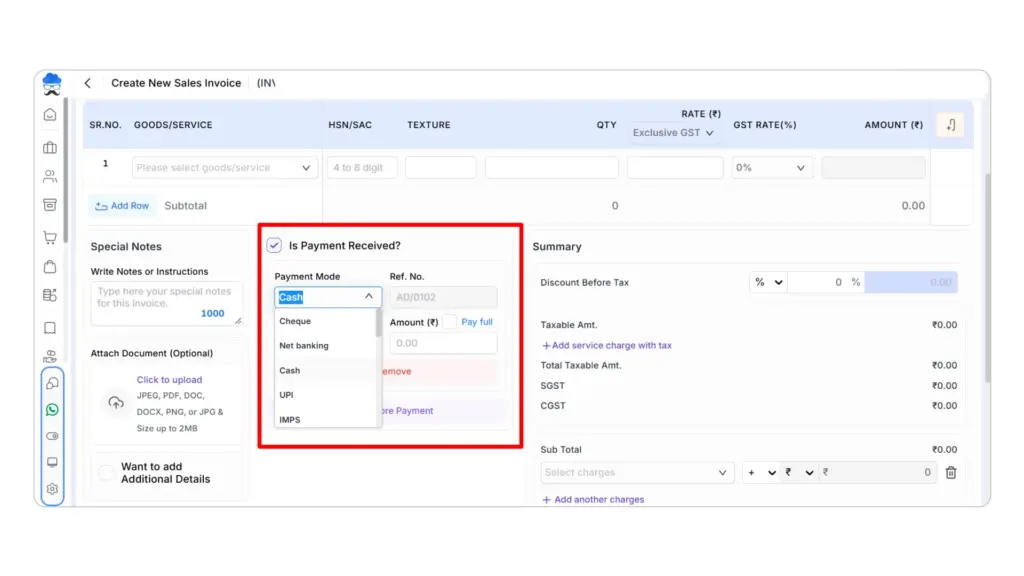
Choose the payment mode used by the customer, such as:
- Cash
- UPI
- Bank payment
- Other available payment modes
Recording the correct payment mode is important for cash and UPI reconciliation.
For example, if you accidentally record a ₹2,000 UPI payment as cash, your total sales can still look correct while your cash and UPI collections appear wrong at closing.
Step 3: Open the Payments Received Report
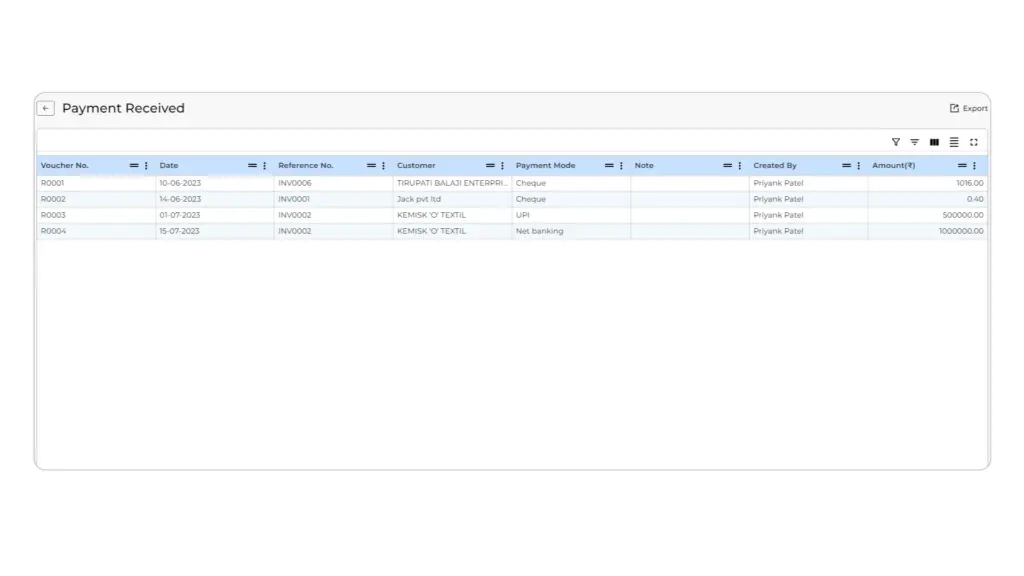
At the end of the day, open the Payments Received Report and select the required date.
You can then review the payments recorded during the day instead of reopening every individual invoice.
If you are already using Munim Billing & Accounting, this is the report we recommend checking first when your physical cash, UPI or bank collection does not agree with the figure you expected.
Step 4: Reconcile Collections by Payment Mode
Now compare each payment mode with the amount you actually collected.
This makes daily sales report matching more focused.
Your Munim Billing & Accounting workflow is:
Create invoice → Tick Payment Received → Select payment mode → Open Payments Received Report → Reconcile by payment mode
What Should Existing Munim Billing & Accounting Users Check First?
If you already use Munim Billing & Accounting, start by checking whether you consistently select the correct payment mode while creating invoices.
Then review your Payments Received Report at closing and compare the totals with your cash counter, UPI records and bank collections.
If one payment mode does not agree, investigate that category first instead of reviewing every invoice from the day.
Make Daily Reconciliation Part of Your Closing Routine
Good daily sales reconciliation is not about making every number look identical. It is about being able to explain the difference.
Your invoices tell you what you sold. Your payment records tell you how customers paid. Your bank records tell you what settled. Your stock records tell you what moved.
If you are looking for a simpler way to manage billing and payment reconciliation, start using Munim Billing & Accounting and bring your daily sales records into one organised workflow.
FAQs on Daily Sales Reconciliation
1. What is daily sales reconciliation?
Daily sales reconciliation means matching your sales invoices with payment collections, bank settlements and relevant stock movement for a business day. It helps you identify and explain differences before they accumulate.
2. How do you reconcile daily retail sales?
Start with your total sales, separate collections by payment mode and compare cash, UPI, cards and bank payments with the amounts actually received. You should also account for credit sales, returns and relevant stock movement.
3. Should daily sales equal the bank statement?
No. A payment may settle into your bank on a different day, while today’s bank statement may contain collections relating to previous sales. You should therefore compare transaction records and bank settlements separately.
4. How do you reconcile cash and UPI payments?
Compare recorded cash collections with the cash physically available and match recorded UPI receipts with successful UPI transactions. If the totals differ, investigate only the affected payment mode first.
Disclaimer: "This blog post is for informational purposes only. For specific tax advice related to your business, please consult a qualified Chartered Accountant or GST practitioner."
Related Articles
Explore the latest market news, useful resources for business, and Munim updates.