
GSTR-1 vs GSTR-3B Mismatch: How to Find and Fix Differences Before Filing
 AuthorMehul Jagwani
 Reviewed ByMadhav Bhayani



Summary:
A GSTR-1 vs GSTR-3B mismatch occurs when outward supply or tax liability figures do not match between the two returns. For CAs and tax practitioners managing GST compliance for multiple clients, reconciliation helps identify reporting errors before filing. Compare the client’s sales register with GSTR-1, check the tax breakup and correct eligible errors through GSTR-1A before filing GSTR-3B.
You are preparing GSTR-3B for a client, but the figures don’t match. GSTR-1 shows ₹5.20 lakh in GST liability, while the client’s books show ₹5.05 lakh. Where did the extra ₹15,000 come from?
A closer look reveals two errors: a duplicate sales invoice adding ₹9,000 in GST and a missed credit note worth ₹6,000. Together, they explain the GSTR-1 vs GSTR-3B mismatch.
For CAs and tax practitioners handling multiple GST clients, identifying such differences before filing is essential. A single incorrect invoice can affect tax liability, return accuracy and client compliance.
In this guide, we’ll explain how to identify these differences, correct them and use Munim GST to review GSTR-1 and GSTR-3B figures before filing.
Why Does a GSTR-1 vs GSTR-3B Mismatch Happen?
Most mismatches arise from invoice reporting errors, incorrect tax classification or transactions reported in different tax periods.
| Reason | What Goes Wrong | What You Should Check |
| Missing invoice | Client’s sales invoice omitted from GSTR-1 | Invoice number and tax period |
| Duplicate invoice | Same invoice reported twice | Invoice number, GSTIN and amount |
| Missing credit note | Sales reduction not reflected | Credit note records |
| Missing debit note | Additional tax liability not included | Debit note details |
| Incorrect GST rate | Wrong tax amount calculated | HSN/SAC and applicable GST rate |
| Wrong tax head | IGST reported instead of CGST and SGST, or vice versa | Place of supply |
| Previous period invoice | Transaction reported in a later period | Original invoice date and tax payment |
| Incorrect amendment | Original and amended figures not reconciled | Amendment history |
| E-invoice duplication | Auto populated invoice entered again | IRN and invoice details |
When you manage GST returns for multiple clients, these differences can become difficult to identify manually, especially when each client has hundreds or thousands of invoices.
The key is to identify whether the difference is caused by incorrect reporting, tax classification or an adjustment belonging to another period.
Designed for Modern Tax Professionals
A premium filing solution for CAs and tax consultants who need speed, scale, and operational clarity.
 Handle multiple clients with ease
- Reconcile and validate with confidence
- Overcome the limitations of the GST portal
 Handle multiple clients with ease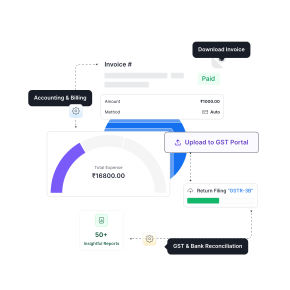
How We Help You Reconcile GSTR-1 and GSTR-3B in Munim GST
When you handle GST returns for multiple clients, switching between GST portal downloads, spreadsheets and individual return summaries can make reconciliation time consuming.
At Munim, we provide a dedicated GSTR-3B vs GSTR-1/1A reconciliation report to help CAs and tax practitioners compare return figures, identify discrepancies and review the results.
How to Find the ₹15,000 Difference Using Munim GST
Consider the same example where GSTR-1 shows ₹5.20 lakh and the correct liability is ₹5.05 lakh.
Here’s how our workflow supports your investigation.
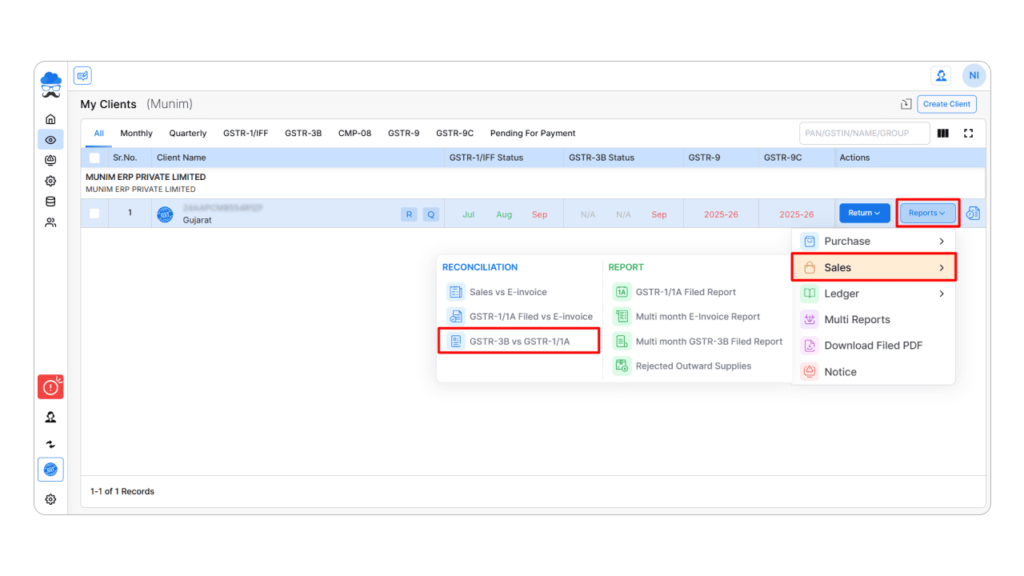
Step 1: Open the reconciliation report
Go to My Clients → Reports → Sales → GSTR-3B v GSTR-1/1A.
Select the relevant client and tax period.
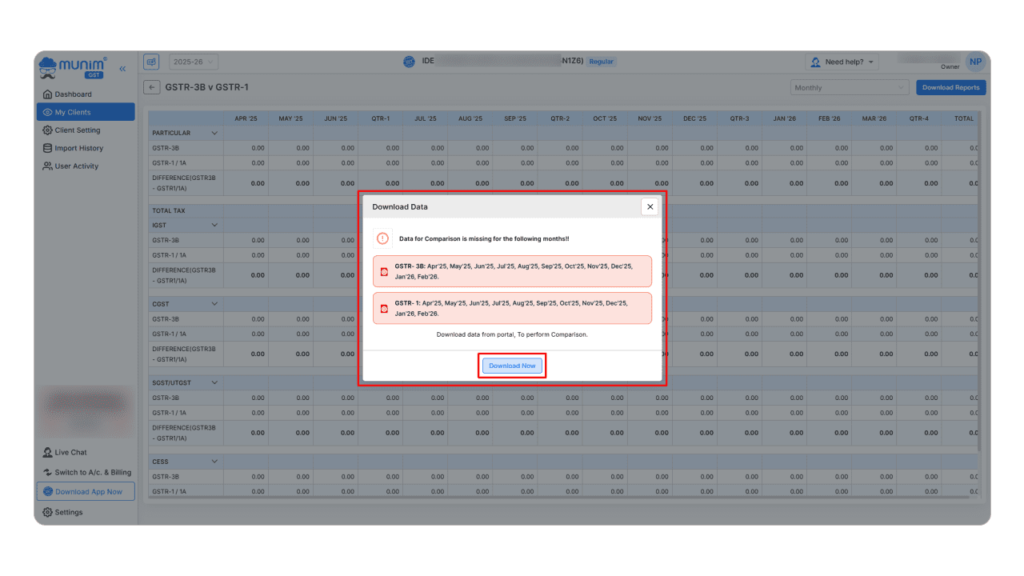
Step 2: Download GST portal data
Click Download Now to fetch the required GSTR-1/1A and GSTR-3B data. Munim highlights missing months so you can download the required information.
Step 3: Compare the reported values
Once the data is downloaded, review the summary to identify differences between the reported return figures.
For example, the comparison may highlight a ₹15,000 difference if GSTR-3B reflects ₹5.05 lakh while GSTR-1 reflects ₹5.20 lakh.
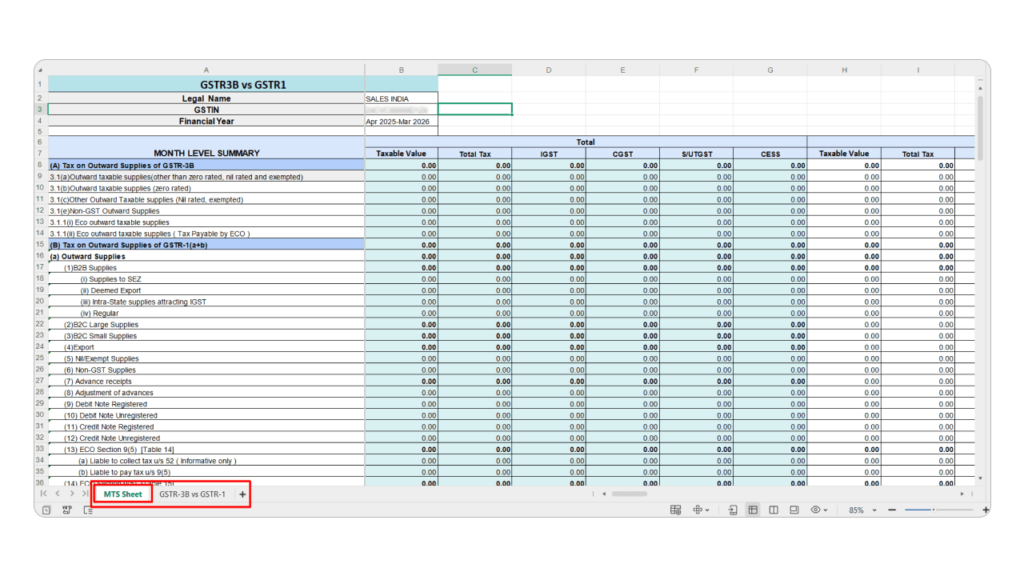
Step 4: Export and investigate the difference
Download the detailed Excel report and compare the return figures against the client’s sales register.
This helps you investigate whether the ₹15,000 difference relates to a duplicate invoice, missing credit note or another reporting issue.
Step 5: Correct and verify
After identifying the underlying errors, make the applicable corrections through the GST return process. Recheck the updated return information before completing the filing.
Important: Our GSTR-3B vs GSTR-1/1A report compares GST return values. You should verify the underlying invoices and credit notes against the client’s records to establish the exact cause. Also, if GSTR-3B has not yet been filed, the comparison should use the available return summary or liability data, rather than assuming a filed GSTR-3B report already exists.
Why Use Munim GST for Reconciliation?
| Your Requirement as a CA | How We Help |
| Compare client GST returns | Dedicated GSTR-3B vs GSTR-1/1A reconciliation report |
| Review multiple tax periods | Monthly and quarterly views |
| Retrieve GST return information | Download required data from the GST portal |
| Investigate differences | Summary and detailed Excel reports |
| Maintain reconciliation records | Export reports for verification and documentation |
| Manage multiple clients | Access client specific reports through My Clients |
You can also refer to our GSTR-3B vs GSTR-1/1A reconciliation guide for the complete workflow.
Already Using Munim GST?
Make the GSTR-3B vs GSTR-1/1A report part of your regular client return review.
Before completing the filing, check the period wise values, download the reconciliation report and investigate any unexplained differences. If return data changes on the GST portal, download it again to review the updated figures.
Using Another GST Software?
If you are currently managing GST returns through another software or a combination of the GST portal and Excel, you can explore how we handle reconciliation in Munim GST.
Our workflow brings client wise GST return comparisons, period wise reports and downloadable reconciliation details into one platform. You can review the process and see whether it fits your firm’s existing GST filing workflow.
Explore Munim GST Reconciliation Software
Final Thoughts: Reconcile Before You File
A GSTR-1 vs GSTR-3B mismatch may begin with a duplicate invoice, missed credit note or incorrect tax classification. But for a CA managing multiple client returns, identifying these differences before filing is an important part of maintaining accurate GST compliance.
As we saw in the example, a ₹15,000 difference could come from just two incorrect transactions. The sooner you identify the source, the easier it becomes to take the appropriate corrective action.
At Munim, we help you compare GSTR-1/1A and GSTR-3B figures through a structured reconciliation workflow so you can review your clients’ return data with greater clarity.
Whether you already use Munim GST or are considering it for your CA practice, explore our reconciliation reports and see how they can support your GST filing process.
Frequently Asked Questions
1. Can you file GSTR-3B if there is a mismatch?
A difference does not automatically prevent GSTR-3B filing. However, as a CA or tax practitioner, you should identify reporting errors, verify the tax liability and complete applicable corrections before filing. Unexplained or unpaid liabilities may lead to compliance action.
2. Can you correct GSTR-1 after filing?
Yes. Eligible current period errors can be corrected through GSTR-1A before filing GSTR-3B. Errors relating to earlier periods generally require amendments through a subsequent GSTR-1, subject to the applicable statutory limits.
3. Can you file GSTR-1A after GSTR-3B?
No. GSTR-1A is available only before filing GSTR-3B for the same tax period. It is an optional facility that can be used once per period.
4. Can Munim GST help CAs identify GSTR-1 and GSTR-3B differences?
Yes. We provide a GSTR-3B vs GSTR-1/1A reconciliation report with monthly and quarterly views and downloadable Excel details. CAs can use it to compare reported values across client returns and investigate differences using supporting transaction records.
5. How can CAs reconcile GST returns for multiple clients?
CAs can establish a standard reconciliation process covering sales records, GSTR-1/1A, tax liability and GSTR-3B for every client. Munim GST provides client specific reconciliation reports that help organise return comparisons and supporting reviews.
Disclaimer: "This blog post is for informational purposes only. For specific tax advice related to your business, please consult a qualified Chartered Accountant or GST practitioner."
Post Tags
Related Articles
Explore the latest market news, useful resources for business, and Munim updates.