
Cancel, Amend or Issue a Credit Note? How to Correct an E-Invoice in India
 AuthorMehul Jagwani
 Reviewed ByCA Madhav Bhayani



Summary:
An e-invoice cannot be directly edited on the Invoice Registration Portal after IRN generation. Within 24 hours, an incorrect IRN can generally be cancelled and a fresh invoice issued with a new document number. After 24 hours, businesses need to determine whether the error requires a GSTR-1 amendment, credit note, debit note or accounting correction.
A business generates an e-invoice, the IRN is created, and the invoice is sent to the customer. A few minutes later, the accounts team spots the problem: the GSTIN is wrong, the taxable value is incorrect, or the tax amount does not match.
Now the question is not just what went wrong, but how to correct e-invoice details without creating a bigger GST mismatch.
In this blog, we will understand how to correct an e-invoice in various scenarios and what conditions should be followed.
E-Invoice Correction Decision Table
The correct action depends on when the error is found and what needs to change. This table provides a practical starting point.
| Situation | When Found | Usual Correction Route |
| Wrong customer GSTIN | Within 24 hours | Cancel IRN and issue a corrected invoice with a fresh document number |
| Wrong customer GSTIN | After 24 hours | Review the applicable GSTR-1 amendment |
| Completely incorrect invoice | Within 24 hours | Cancel the IRN and issue a corrected invoice |
| Incorrect reporting detail | After 24 hours | Review the applicable GSTR-1 amendment |
| Goods returned | After supply | Consider a credit note |
| Taxable value or GST charged in excess | After invoicing | Consider a credit note where GST conditions are met |
| Taxable value or GST charged short | After invoicing | Consider a debit note or upward adjustment |
| Order cancelled | Within 24 hours | Cancel the IRN, subject to e-way bill conditions |
| Minor accounting error with no GST impact | Any time | Correct the accounting records as applicable |
The key is not to use the same correction for every mistake. A wrong e invoice correction should reflect what actually happened in the transaction.
Designed for Modern Tax Professionals
A premium filing solution for CAs and tax consultants who need speed, scale, and operational clarity.
 Handle multiple clients with ease
- Reconcile and validate with confidence
- Overcome the limitations of the GST portal
 Handle multiple clients with ease
What Is the E Invoice Cancellation Time Limit?
The e invoice cancellation time limit is 24 hours from the time the invoice is reported to the IRP.
If an error is found within this period, the business should:
- Check what information is incorrect.
- Check whether an e-way bill is linked.
- Cancel the e-way bill first where required and permitted.
- Cancel the incorrect IRN within 24 hours.
- Correct the invoice details.
- Create a fresh invoice with a new document number.
- Generate a new IRN.
The IRP does not allow partial cancellation. Also, once an IRN is cancelled, the same invoice number cannot be reused for another IRN. An active or transit-verified connected e-way bill can also prevent IRN cancellation.
Example
Suppose an invoice contains:
- Taxable value: ₹1,50,000
- GST: ₹27,000
- Total: ₹1,77,000
Three hours after generating the IRN, the accounts team notices that the customer’s GSTIN is incorrect.
Since the issue is identified within 24 hours, the business can generally cancel the incorrect IRN, subject to the e-way bill conditions, and issue the corrected transaction with a fresh invoice number.
What If the Error Is Found After 24 Hours?
After 24 hours, the IRN cannot be cancelled through the IRP.
At that point, the correction depends on the error:
- Incorrect reporting details: Review the applicable GSTR-1 amendment.
- Excess value or GST: Consider whether a credit note is appropriate.
- Short billed value or GST: Consider a debit note or upward adjustment.
- Goods returned or supply deficiency: A credit note may apply.
- Accounting only error: Correct the books as required.
GSTN states that IRP amendments are not possible. Changes to invoice details can instead be made through the GST portal while filing GSTR-1 or through the applicable amendment mechanism if GSTR-1 has already been filed.
How to Cancel an E-Invoice in Munim
If a business already uses Munim Billing & Accounting for e-invoicing, it does not need to leave the accounting workflow just to start an eligible cancellation.
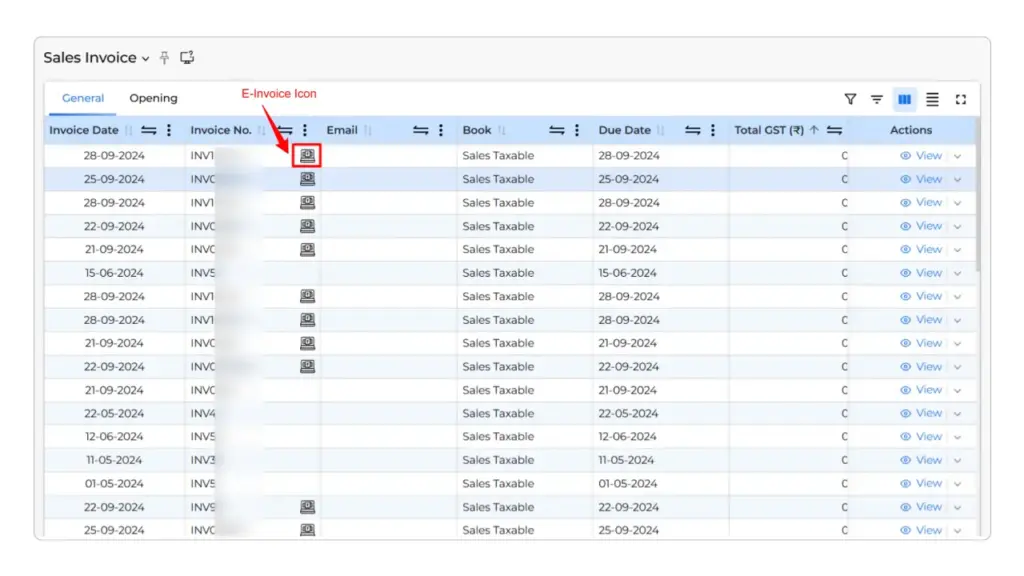
We have built the option into the Sales Invoice section:
- Go to Sales > Sales Invoice.
- Find the invoice.
- Click the E-Invoice icon.
- Open the E-Invoice Action window.
- Select Cancel E-Invoice.
- Confirm the cancellation.
The same GST rule still applies. The e-invoice must be eligible for cancellation and the request must be made within the permitted 24 hour period.
If the business handles many B2B invoices, we also support bulk e-invoice generation from the Sales Invoice section, including status tracking and error reports for failed invoices.
How to Record a Credit Note in Munim
Where the transaction genuinely requires a credit note, Munim records it through the Sales Return workflow.
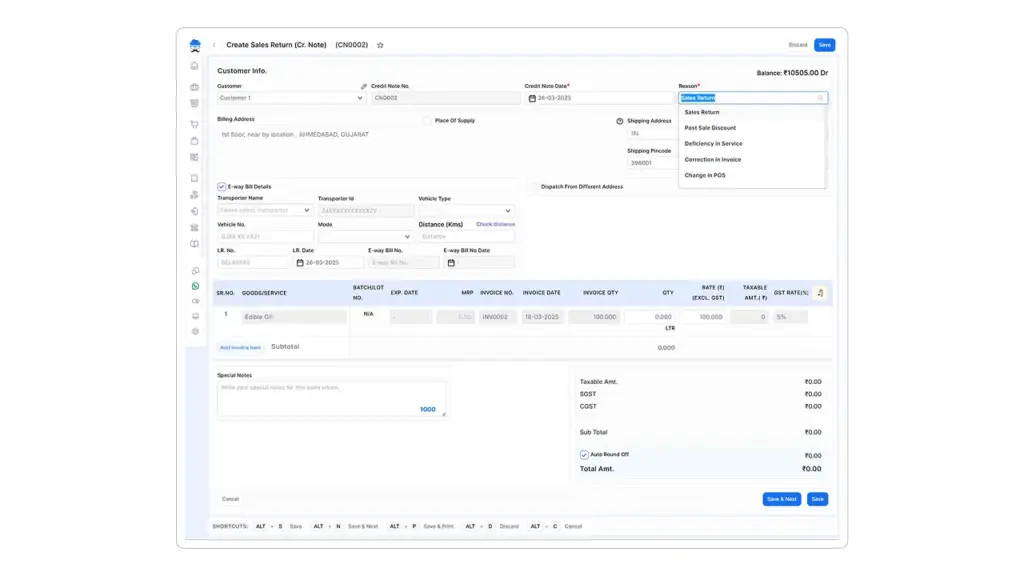
The user can:
- Go to Sales > Sales Return.
- Select Create Sales Return.
- Choose the customer.
- Enter the credit note date.
- Select the applicable reason.
- Choose the original invoice.
- Enter the relevant item, quantity and taxable amount.
- Verify GST values.
- Save the transaction.
The selected accounting entry should reflect the actual GST treatment. Software can record the correction, but the business still needs to determine whether an amendment, credit note or debit note is legally appropriate.
Summing Up
Correcting an e-invoice starts with two questions: when was the mistake found, and what actually needs to change?
If the error is caught within 24 hours, cancellation may be possible. After that, the business may need a GSTR-1 amendment, credit note, debit note or another accounting correction.
For existing Munim users, we keep these actions connected with the underlying sales and accounting records. If the business is not using Munim yet, it can start with our 7-day free trial and manage e-invoicing alongside its regular billing and accounting workflow.
Getting the correction right the first time keeps the e-invoice, GSTR-1 and books in sync, and that is exactly what we help businesses do.
FAQs
Can the same invoice number be reused after cancellation?
No. The document number linked to a cancelled IRN should not be reused to generate another IRN. The corrected invoice requires a fresh document number.
Can an e-invoice be partially cancelled?
No. IRN cancellation applies to the complete document. If only part of a completed supply is subsequently reduced, an appropriate credit note may be required.
What if an e-way bill is linked to the invoice?
The e-way bill status should be checked before attempting IRN cancellation. An active or verified linked e-way bill can restrict cancellation of the IRN.
Disclaimer: "This blog post is for informational purposes only. For specific tax advice related to your business, please consult a qualified Chartered Accountant or GST practitioner."
About the author

Mehul is a seasoned content writer with a passion for simplifying complex accounting and GST topics. With a keen interest in entrepreneurship and business management, he specializes in creating informative and engaging content for themunim.com. His goal is to help businesses understand and implement accounting and GST software solutions effectively. When he's not crafting content, Mehul enjoys exploring new places and spending time with his Golden Retriever.
Post Tags
Related Articles
Explore the latest market news, useful resources for business, and Munim updates.