
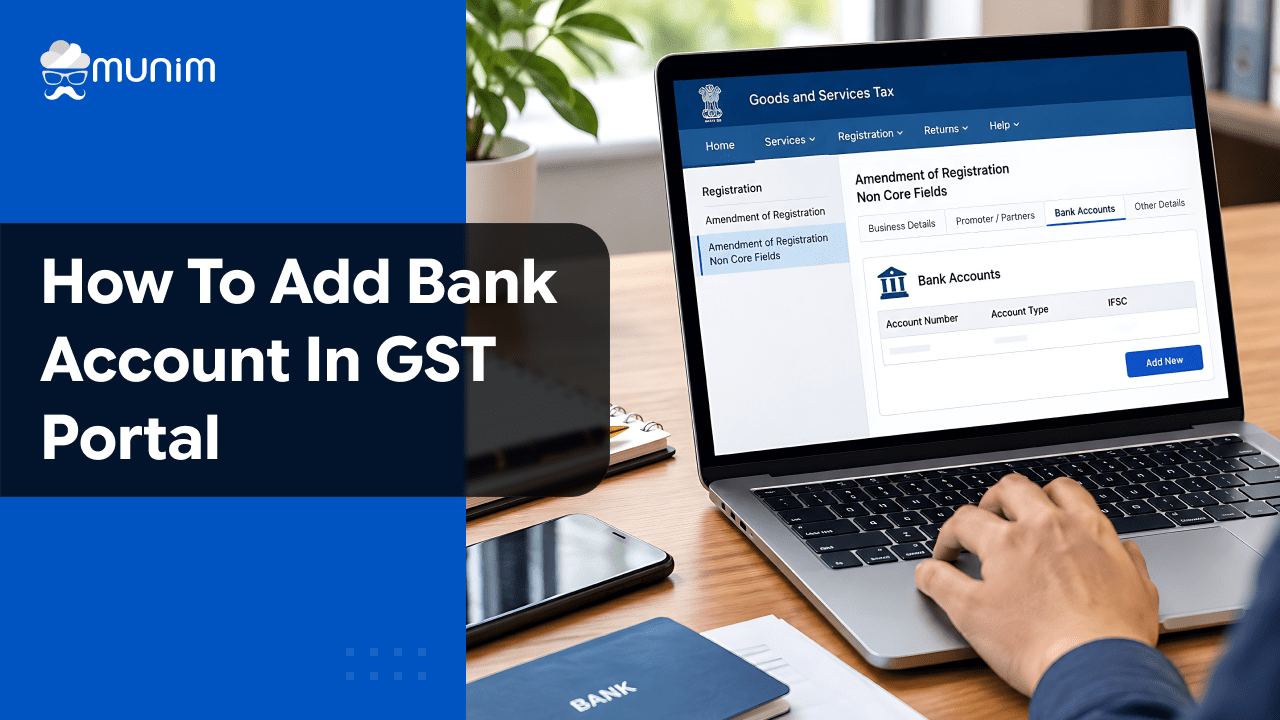
How to Add Bank Account in GST Portal: Step by Step Guide
 AuthorMehul Jagwani
 Reviewed ByCA Madhav Bhayani



- Why Do You Need to Add Bank Account Details to Your GST Registration?
- What Is the Time Limit for Adding a Bank Account Under GST?
- What Should You Keep Ready Before Adding Bank Details?
- 7 Steps to Add Your Bank Account on the GST Portal
- How Can You Check Whether Your GST Bank Account Is Verified?
- Common Bank Account Validation Errors and How to Fix Them
- Can You Change Bank Account Details After Adding Them?
- Keep Your Bank and GST Records Organised with Munim
- Keep Your GST Registration Updated and Filing Hassle-Free
- FAQs on Adding a Bank Account to the GST Portal
Summary:
You can add your bank details through Services > Registration > Amendment of Registration Non Core Fields on the GST portal. Enter your account number and IFSC, validate the details, upload bank proof and submit the amendment using DSC or EVC, as applicable.
You have received your GSTIN and are ready to start your business. But while preparing your first GST return, you realise your bank details are missing.
If you have just received your GSTIN as a new business owner or small trader, this guide is for you.
Wondering how to add a bank account in the GST portal? You can update your details through the GST portal’s Amendment of Registration Non Core Fields section. Missing the prescribed deadline can block GSTR-1 filing and may lead to GST registration suspension.
Why Do You Need to Add Bank Account Details to Your GST Registration?
Adding your bank account helps verify that the account belongs to your GST registered business and is linked to the correct PAN. It also supports GST refund processing.
You can obtain GST registration without initially providing bank details. However, under Rule 10A, most registered taxpayers must add them within the prescribed timeline.
What Is the Time Limit for Adding a Bank Account Under GST?
Under Rule 10A of the CGST Rules, 2017, most taxpayers must add bank details within 30 days of GST registration or before filing GSTR-1 or using IFF, whichever is earlier.
For example, suppose you run a wholesale business in Surat and receive your GSTIN on 5 October 2026. If your first GSTR-1 filing falls before the 30 day period ends, you must add your bank details before filing.
What happens if you miss the deadline?
- You may be unable to file GSTR-1 or use the Invoice Furnishing Facility (IFF).
- Continued non compliance may invite show-cause notice
We recommend updating your bank details soon after receiving your GSTIN rather than waiting until your return filing date.
Designed for Modern Tax Professionals
A premium filing solution for CAs and tax consultants who need speed, scale, and operational clarity.
 Handle multiple clients with ease
- Reconcile and validate with confidence
- Overcome the limitations of the GST portal
 Handle multiple clients with ease
What Should You Keep Ready Before Adding Bank Details?
Before starting, we recommend keeping these details and documents ready:
- GST portal username and password
- Bank account number and account type
- Correct IFSC
- Cancelled cheque, first page of the bank passbook or bank statement, as applicable and accepted by the portal
- Authorised signatory details
- Registered mobile number for EVC or DSC, as applicable
Make sure the account belongs to the registered person and is linked to the appropriate PAN. This helps avoid validation issues.
7 Steps to Add Your Bank Account on the GST Portal
You can add your bank account through a non-core amendment, which normally does not require approval from a GST officer.
Follow these seven steps.
Step 1: Log in to the GST Portal
Visit www.gst.gov.in and sign in using your username and password.
Step 2: Open the Amendment Section
Go to Services > Registration > Amendment of Registration Non Core Fields.
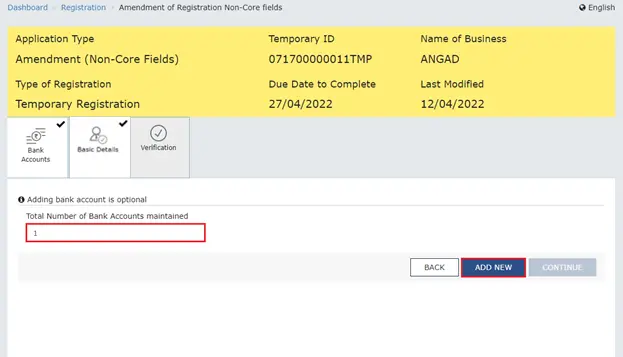
Step 3: Select Bank Accounts
Open the Bank Accounts tab, enter the number of accounts maintained and click Add New.
Step 4: Enter Your Bank Details
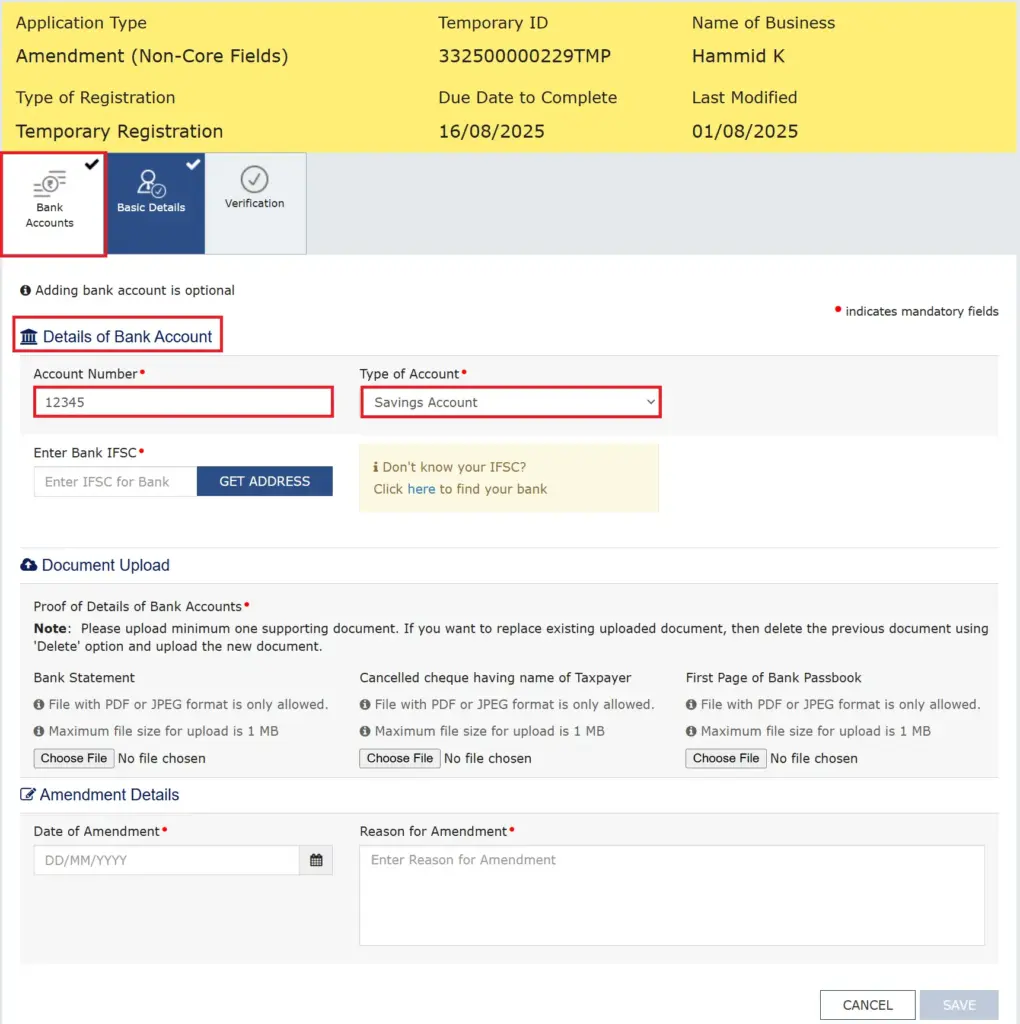
Enter your bank account number, select the account type and provide the IFSC. Click Get Address to fetch the bank branch details.
Step 5: Validate Your Account
Click Validate Account Details. Check the validation result and correct any mismatch in the account number, PAN or IFSC.
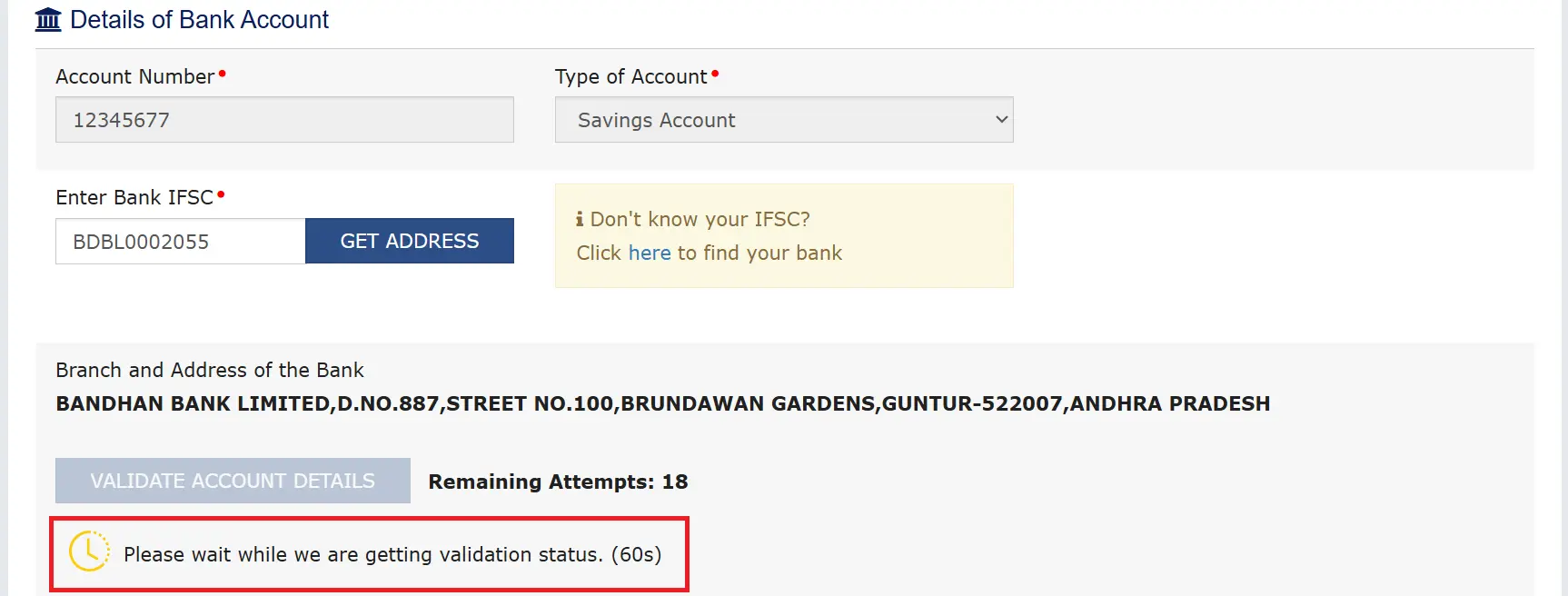
Step 6: Upload Bank Proof
Upload the required supporting document. Enter the amendment date and reason, then click Save and continue.
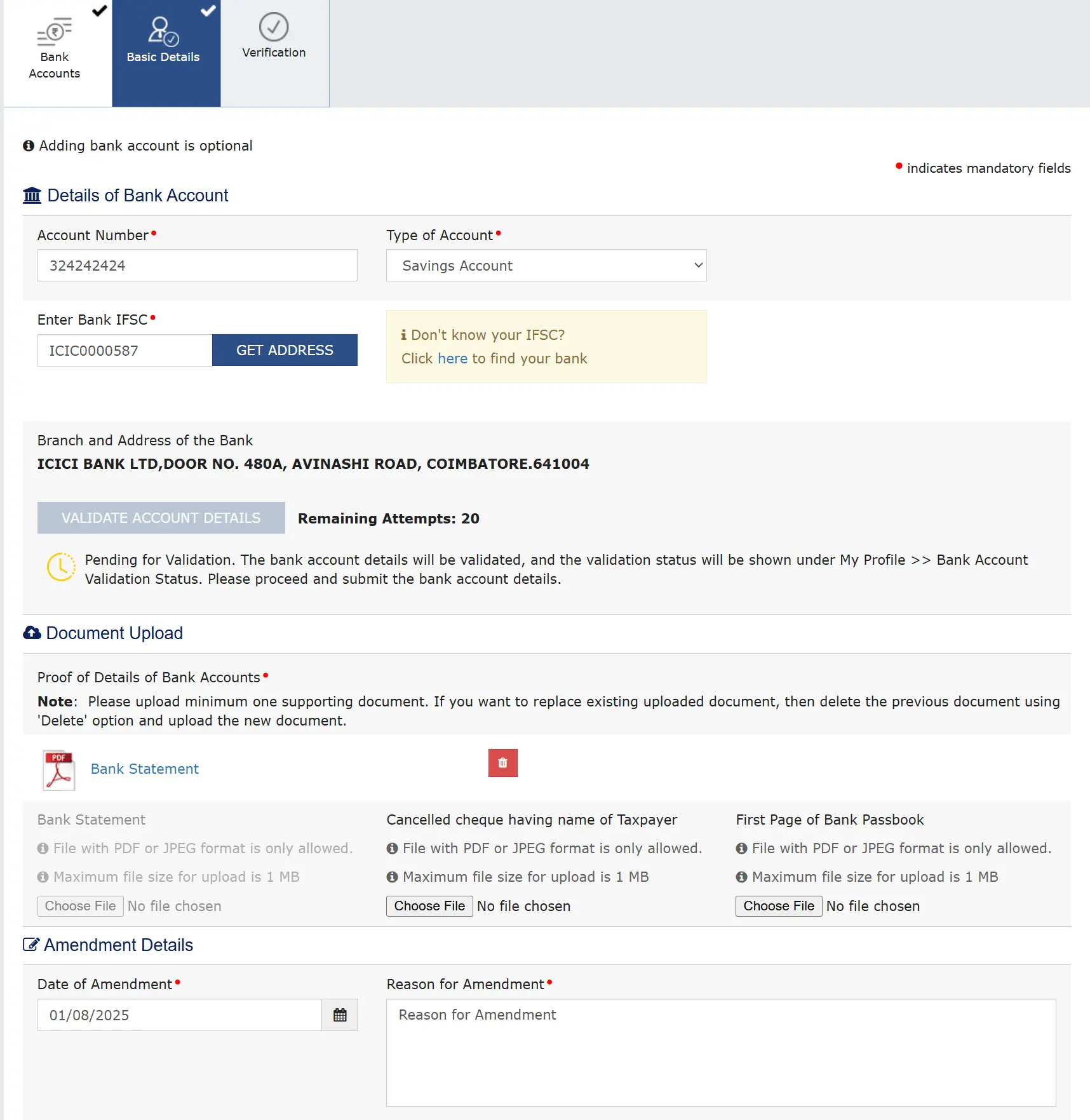
Step 7: Submit the Application
Open Verification, select the authorised signatory, complete the declaration and submit using DSC or EVC, as applicable.
Once submitted, save your acknowledgement details and check your bank account validation status.
How Can You Check Whether Your GST Bank Account Is Verified?
After submitting your bank details, log in to the GST portal and check Bank Account Status under your profile or Quick Links.
The status may show:
| Status | What it means | What you should do |
| Successful | Bank details are verified | No further correction is normally needed |
| Failed | Account validation failed | Check account number, PAN and IFSC |
| Pending | Verification is still in progress | Check again later |
| Successful with remark | Account validated with an observation | Review the remark and resolve any issue |
We recommend checking this status even after successfully submitting the amendment. Submission and successful bank validation are not necessarily the same thing.
Common Bank Account Validation Errors and How to Fix Them
Even a small mistake in your banking information can cause validation issues.
| Common error | What you should do |
| PAN mismatch | Check whether the PAN linked to your bank account matches your GST registration PAN |
| Incorrect IFSC | Verify the IFSC using your bank’s official records |
| Wrong account number | Recheck every digit against your bank statement |
| PAN missing in bank records | Contact your bank to update PAN details |
| Inactive bank account | Contact your bank to resolve the account status |
| Validation pending | Wait for the validation result and check again |
Avoid repeatedly submitting incorrect details. Correct the underlying issue before trying again.
Can You Change Bank Account Details After Adding Them?
Yes. You can update your bank account details later through the Amendment of Registration Non Core Fields section.
You may need to make changes when:
- You switch to another bank.
- You close an existing account.
- Your bank account details change.
- You need to add another business bank account.
- You entered incorrect information earlier.
If you have only one bank account registered on the portal, add a replacement before deleting the existing account.
Keep Your Bank and GST Records Organised with Munim
Updating your bank account on the GST portal is one compliance task. Keeping your invoices, accounting records and GST returns organised is another.
At Munim, we recommend checking your registration details before preparing GST returns so that missing information does not interrupt your filing process.
If you already use Munim GST, you can continue preparing your GSTR-1, reviewing GST data and managing return filing through your existing workflow. However, bank account amendments to GST registration must be completed on the official GST portal.
For business owners working with accountants or tax consultants, keeping your registration information updated also helps your filing team avoid last minute compliance issues.
With Munim GST, we bring GST reconciliation, validation and return filing together in an organised workflow.
Keep Your GST Registration Updated and Filing Hassle-Free
Knowing how to add a bank account in the GST portal helps you maintain accurate registration details and avoid return filing interruptions.
Add your bank details within the prescribed deadline, verify the account information and check the validation status before filing GSTR-1.
Once your registration details are updated, let us help you simplify the rest of your GST compliance with Munim GST.
Start your 7-day free trial of Munim GST and manage GST reconciliation, validation and return filing in one place.
FAQs on Adding a Bank Account to the GST Portal
Is adding a bank account mandatory after GST registration?
Yes, for most taxpayers covered by Rule 10A. You must furnish bank details within 30 days of registration or before filing GSTR-1 or using IFF, whichever is earlier. Certain registration categories are exempt from this requirement.
Does the bank account need to match the GST PAN?
Yes. The bank account should belong to the registered person and be associated with the PAN used for GST registration. A mismatch can result in failed validation.
Can I add more than one bank account to my GST registration?
Yes. The GST portal allows you to add multiple bank accounts through the Bank Accounts section of your registration details.
What should I do if bank validation fails?
Check your account number, IFSC and PAN details. If everything is correct, contact your bank to check whether the PAN is updated and the account is active.
Can I change my GST registered bank account later?
Yes. You can modify or add bank details through the Amendment of Registration Non Core Fields section without normally requiring GST officer approval.
Can I file GSTR-1 without adding bank details?
No, if Rule 10A applies and you have not furnished the required bank account details. Rule 59 restricts GSTR-1 and IFF filing in such cases.
What documents are required to add a bank account?
Keep a cancelled cheque, the first page of your bank passbook or a bank statement ready. Upload the supporting document accepted by the GST portal.
How can I check whether my bank account is verified?
Log in to the GST portal and open Bank Account Status from your profile or Quick Links. Check whether the status is successful, failed, pending or successful with a remark.
Disclaimer: "This blog post is for informational purposes only. For specific tax advice related to your business, please consult a qualified Chartered Accountant or GST practitioner."
About the author

Mehul is a seasoned content writer with a passion for simplifying complex accounting and GST topics. With a keen interest in entrepreneurship and business management, he specializes in creating informative and engaging content for themunim.com. His goal is to help businesses understand and implement accounting and GST software solutions effectively. When he's not crafting content, Mehul enjoys exploring new places and spending time with his Golden Retriever.
Related Articles
Explore the latest market news, useful resources for business, and Munim updates.