
Negative Stock in Inventory: Why It Happens and How to Fix It Before Billing
 AuthorMehul Jagwani
 Reviewed ByCA Ajay Savani



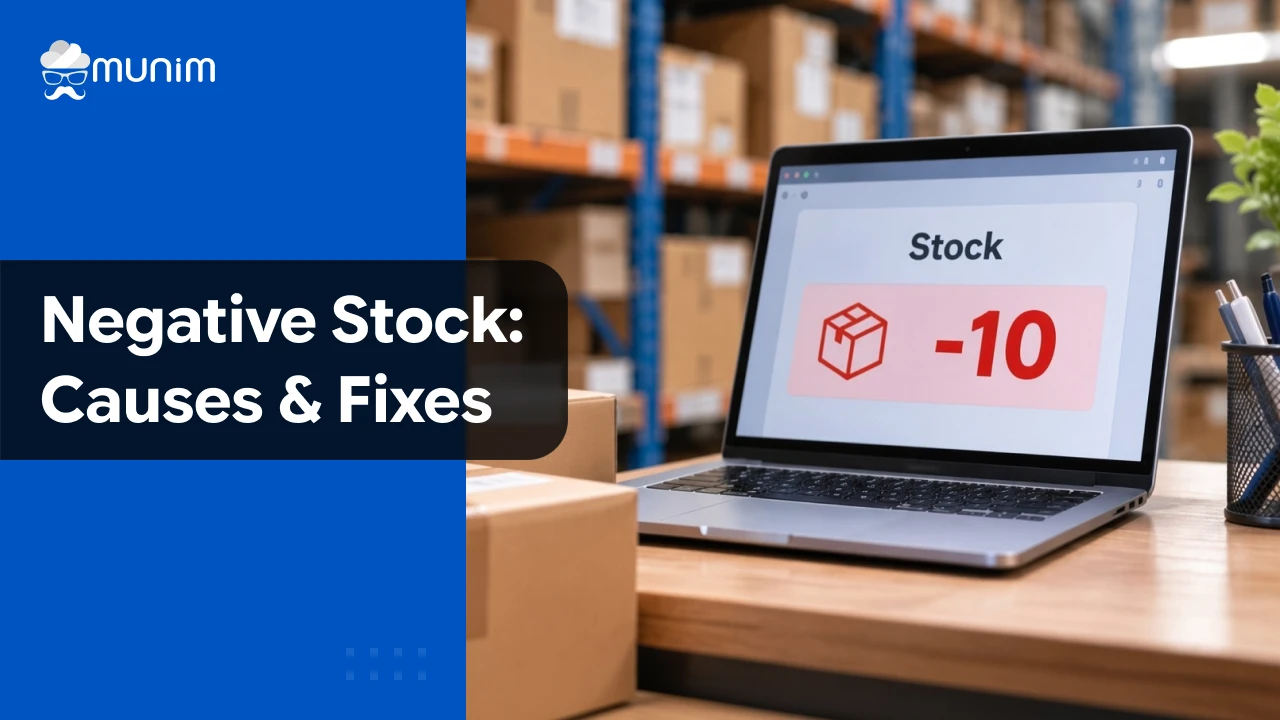
Imagine a customer is waiting for their invoice. You have the product in your shop, but when you try to generate the bill, your accounting software shows -5 units in stock. Now you’re left wondering whether the stock entry is wrong, a purchase was missed, or something else went wrong.
If you’re a retailer, wholesaler, manufacturer or accountant dealing with negative stock in inventory, you’ve probably faced a similar situation.
At Munim, we understand how these discrepancies can disrupt billing and create confusion in your inventory records. In this guide, we’ll help you identify what’s causing negative stock, correct the mismatch and prevent it from happening again.
What Is Negative Stock in Inventory?
Negative stock occurs when your recorded sales or stock consumption exceeds the available quantity in your inventory system.
For example, you have 20 units of a product in your system and generate invoices for 25 units. If negative inventory is allowed, your stock balance becomes -5 units.
| Transaction | Stock Movement | Available Stock |
| Opening stock | +20 | 20 |
| First sale | -15 | 5 |
| Second sale | -10 | -5 |
Your system now shows a shortage of 5 units.
This doesn’t necessarily mean you’ve physically run out of stock. You may have received goods without recording the purchase, entered an incorrect quantity or selected the wrong warehouse.
We recommend checking the actual stock and transaction records before making any correction.
Negative stock can also affect your financial reporting. Incorrect stock records may lead to inaccurate closing stock valuation and profit figures. They can also affect purchasing decisions, as your system may show a shortage even when sufficient goods are physically available.
What Causes Negative Stock in Inventory?
Most negative stock issues arise from incorrect or missing inventory entries. Here are the common causes and what you should check.
1. Missing or Incorrect Opening Stock
If you started using accounting software with 100 units but forgot to enter your opening stock, the system won’t recognise those units when you generate invoices.
What to check: Compare the opening quantity entered in your software with your stock records from the date you started using it.
In Munim Billing & Accounting, you can maintain opening quantities and rates for inventory items.
2. Unrecorded Purchase Bills
Your supplier delivers 50 units, but your team forgets to enter the purchase bill. You start selling those products, and the system shows a shortage despite the goods being physically available.
What to check: Match goods received against purchase bills and identify any missing entries.
You can also use a Goods Received Note (GRN) to verify the quantities received from your supplier before recording the purchase.
If you’re using Munim, go to Purchase → Purchase Bill to record the missing purchase against the correct item and location.
3. Incorrect Sales Quantity
You have 8 units available, but someone enters 18 instead of 8 on an invoice. That entry can create a shortage of 10 units if negative billing is permitted.
What to check: Verify the invoice quantity against the actual goods supplied. You can also cross-check the quantity against the delivery challan, where applicable, to identify any difference between the goods dispatched and the quantity billed.
4. Wrong Warehouse Selection
You have 25 units in your Surat warehouse but none in Ahmedabad. If you generate an invoice using the Ahmedabad location, the system may report insufficient stock even though your business has 25 units overall.
What to check: Confirm the selected warehouse and the actual location of the goods.
If stock was physically transferred, ensure the transfer is recorded.
5. Incorrect Returns or Stock Adjustments
Duplicate purchase returns, incorrect return quantities or stock adjustments can reduce the recorded balance unexpectedly.
What to check: Review recent purchase returns, sales returns and adjustments for duplicate or incorrect entries.
6. Unrecorded Wastage or Production Consumption
For manufacturers and businesses handling perishable goods, stock may be damaged, consumed or used in production without the corresponding inventory entry.
This usually creates a difference between physical and recorded stock, which can contribute to later discrepancies.
What to check: Verify wastage, consumption and production records against physical quantities.
7. Back-Dated Transactions
If a purchase is recorded after the date of a related sale, your historical stock balance may become negative even when today’s closing balance looks correct.
What to check: Compare purchase and sales dates in the Stock Register.
How to Fix Negative Stock in Inventory Using Munim Billing & Accounting
If you’re already using Munim Billing & Accounting, you can investigate stock discrepancies through our inventory reports and stock management features.
We recommend following these steps before generating further invoices for the affected item.
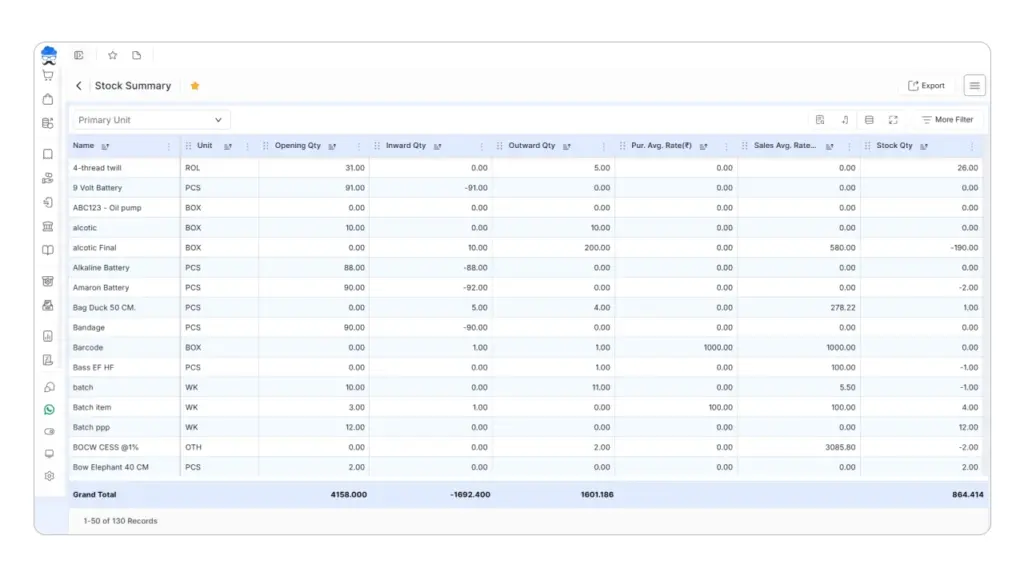
Step 1: Check Your Stock Summary
Go to Reports → Item Report → Stock Summary.
Review the affected item’s:
- Opening stock
- Inward quantity
- Outward quantity
- Available stock
Compare the available quantity with your physical stock. If you’re managing multiple warehouses, select the relevant warehouse before checking its balance.
Our Stock Summary helps you identify whether the discrepancy relates to stock received, stock issued or the opening balance.
Step 2: Find the Incorrect Transaction
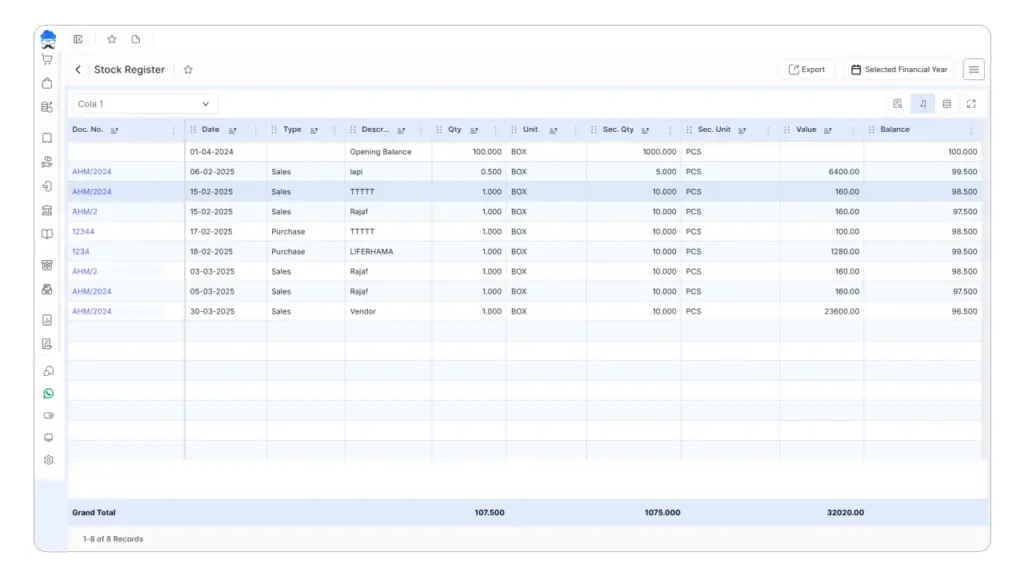
Go to Reports → Item Report → Stock Register Report.
Select the affected item and date range. Review its stock movements to identify when the discrepancy started.
Look for missing purchases, unusually large sales quantities, incorrect returns or transactions recorded on the wrong date.
Step 3: Correct the Source of the Discrepancy
Once you’ve identified the cause, use the appropriate correction.
| Problem Identified | What You Should Do |
| Opening stock is incorrect | Correct the opening quantity after verifying the opening records |
| Purchase bill is missing | Enter the actual Purchase Bill |
| Sales quantity is incorrect | Correct the affected sales transaction appropriately |
| Wrong warehouse was used | Correct the location or record the actual Stock Transfer |
| Return was recorded incorrectly | Verify and correct the return |
| Goods were damaged or consumed | Record wastage or consumption |
| Physical stock differs after checking all transactions | Use Stock Adjustment |
We recommend correcting the original transaction wherever possible rather than creating an adjustment to cover up a missing entry.
Step 4: Adjust Stock if a Genuine Difference Remains
If you’ve verified the transactions but the system quantity still differs from your physical stock, use Munim’s Stock Adjustment feature.
Go to Inventory → Stock Adjustment.
- Select the entry date and location.
- Choose the affected item.
- Review its Computer Stock.
- Enter the verified Physical Stock.
- Check the calculated variation.
- Classify the difference under Adjusted Qty., Wastage Qty. or Consume Qty., as appropriate.
- Review and save the adjustment.
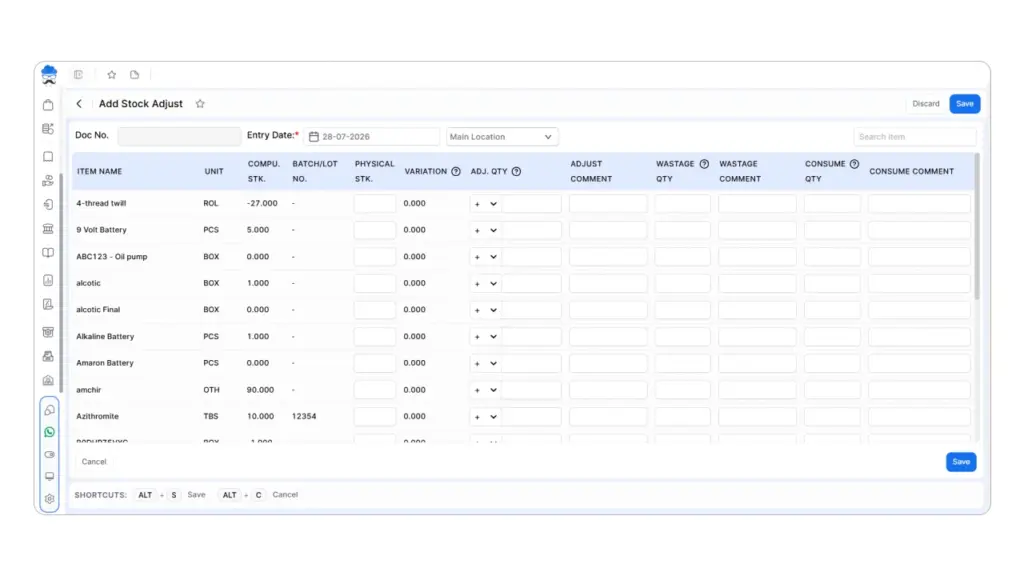
For example:
| Particulars | Quantity |
| Computer stock | 30 |
| Physical stock | 26 |
| Difference | -4 |
If those four units were damaged and no other transaction accounts for the difference, you can record them as wastage.
Munim supports positive and negative stock adjustments, helping you reconcile physical and recorded quantities.
Step 5: Verify the Stock Before Billing
After making the correction, return to Stock Summary and confirm that the available quantity matches your records.
Also check that:
- the correct item and warehouse are selected;
- the invoice quantity does not exceed the available stock; and
- the stock balance reflects the actual transactions.
Once the discrepancy is resolved, you can proceed with billing using the corrected inventory records.
Can You Create an Invoice With Negative Stock in Munim?
Yes. Munim provides a Negative Qty. Allowed option that lets you create sales invoices even when the available quantity is insufficient.
To enable or disable this setting, go to Masters → Item Master → Item, edit the relevant item and find Negative Qty. Allowed. Set it to Yes or No based on your requirement, then save the item.
However, we recommend keeping this setting disabled if you actively maintain inventory.
Allowing negative quantities can help bypass a stock availability restriction, but it doesn’t correct missing purchases, incorrect quantities or warehouse mismatches.
If you receive a Stock Not Available error while billing, check the available quantity and relevant transactions first.
How to Prevent Negative Stock in Inventory
To avoid recurring stock discrepancies, we recommend following these practices:
- Record purchases promptly: Enter purchase bills as soon as goods arrive so your available stock stays updated.
- Disable negative quantity: Keep Negative Qty. Allowed set to No for items where you maintain inventory.
- Record stock movements on time: Update warehouse transfers, returns, wastage and consumption on the same day whenever possible.
- Enable low-stock warnings: In Masters → Item Master → Item, edit the item, keep Negative Qty. Allowed disabled, enable Low Stock Warning and set the Low Stock Qty threshold.
- Reconcile stock regularly: Compare your physical stock with Munim’s Stock Summary and investigate differences before they affect billing.
These practices help you maintain accurate stock records and identify shortages before creating invoices.
Keep Your Inventory Accurate and Billing on Track
Negative stock in inventory is usually a sign that your recorded transactions don’t match the actual movement of goods.
Whether the cause is a missing purchase, incorrect invoice, wrong warehouse or unrecorded consumption, identifying the source helps you make the right correction.
If you’re using Munim, our inventory reports and stock management features can help you review transactions, reconcile quantities and keep stock records organised.
Want fewer inventory discrepancies during billing? Explore Munim Billing & Accounting to manage purchases, sales and stock in one place. Start your 7-day free trial.
FAQs
1. Is negative stock the same as out of stock?
No. Out of stock means the available quantity is zero. Negative stock means your system has recorded more outgoing quantity than available stock.
2. Can negative stock affect inventory valuation?
Yes. Missing or incorrect stock transactions can make inventory valuations and related cost calculations inaccurate.
3. Should I use a Purchase Bill or Stock Adjustment to fix negative stock?
Use a Purchase Bill for a genuine missing purchase. Use Stock Adjustment for a verified difference between physical and recorded stock after reviewing transactions.
4. Why does my software show negative stock when goods are available?
Possible reasons include missing purchase entries, incorrect opening stock, wrong warehouse selection or errors in sales and return transactions.
Disclaimer: "This blog post is for informational purposes only. For specific tax advice related to your business, please consult a qualified Chartered Accountant or GST practitioner."
About the author

Mehul is a seasoned content writer with a passion for simplifying complex accounting and GST topics. With a keen interest in entrepreneurship and business management, he specializes in creating informative and engaging content for themunim.com. His goal is to help businesses understand and implement accounting and GST software solutions effectively. When he's not crafting content, Mehul enjoys exploring new places and spending time with his Golden Retriever.
Related Articles
Explore the latest market news, useful resources for business, and Munim updates.