How to Choose GST Return Filing Software: 6 Things to Check Before You Buy
 AuthorMehul Jagwani
 Reviewed ByCA Madhav Bhayani


- Does the software support the required returns?
- Can existing sales and purchase data be imported easily?
- Can it identify missing and mismatched purchase records?
- Does it support IMS and relevant GST updates?
- Are summaries, reports and filing status easy to check?
- Are pricing and support clear before payment?
- Pick the software that makes filing easier, not just faster
- Common Questions About GST Return Filing Software

Summary:
Choosing GST return filing software for your business? Don’t decide from a demo alone. Test it with one month of your own sales and purchase data. Check that it supports your returns, imports your data cleanly, matches purchases with GSTR-2B, handles IMS, shows clear reports and has clear pricing. Below, see how each check works in Munim.
If you run a small or growing business in India and file GST every month or quarter, this guide is for you. It’s also for the accountant or CA who does the filing for you.
Most filing trouble doesn’t happen on the GST portal. It happens before it. Your accountant fixes Excel sheets, looks for missing invoices and matches purchase records with GSTR-2B, often late at night before the due date.
The right GST return filing software should cut down this work. The best way to find it is simple: test it with your own data, not a sample demo, and check the full cost before you pay.
Already using Munim? Use these 6 checks to see if you’re getting the most out of your current setup.
Designed for Modern Tax Professionals
A premium filing solution for CAs and tax consultants who need speed, scale, and operational clarity.
 Handle multiple clients with ease
- Reconcile and validate with confidence
- Overcome the limitations of the GST portal
 Handle multiple clients with ease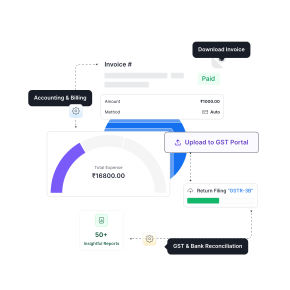
Don’t start with a list of software. Start with a list of your needs. Sit with your accountant for 10 minutes and fill this in:
| What to note | Example |
| Returns you file and how often | GSTR-1 and GSTR-3B, monthly |
| Number of GSTINs | 2 (Gujarat and Maharashtra) |
| Who will use the software | Owner + 1 accountant |
| Invoices per month | About 400 sales, 150 purchases |
| Current accounting or billing software | Tally, exports to Excel |
| Problems you face every month | Missing supplier invoices in GSTR-2B |
1. Does the software support the required returns?
The software should support the business’s applicable forms, including preparation, review and filing. Creating GST invoices alone does not establish return filing capability.
| Business requirement | What to check |
| Sales reporting | GSTR-1 preparation and filing |
| Tax liability and ITC reporting | GSTR-3B preparation and review |
| Same period corrections | GSTR-1A workflow |
| Quarterly filing | Support for the applicable quarterly process |
| Composition compliance | CMP-08 and GSTR-4, where relevant |
| Annual compliance | GSTR-9 and GSTR-9C, where applicable |
The accountant should confirm the relevant types of GST returns before selecting a plan.
Munim workflow: Review the GSTR-1 filing process
- Open My Clients, choose the company and select Return > GSTR-1.
- In Data Prepare, import or add sales records and review the summary.
- Open Check Invoices to verify GSTINs, values and tax details.
- Use Push to GSTN to upload the reviewed data and resolve any returned errors.
- After verifying the generated summary, select Proceed to File. Complete the required authorisation and retain the ARN shown after successful filing.
Buying test: Can the accountant complete the required preparation and review steps without maintaining a separate manual process for a missing feature?
2. Can existing sales and purchase data be imported easily?
The software should import the business’s records with minimal recurring reformatting. An Excel upload option is only useful if the team can prepare the file without rebuilding it each month.
During the demo, the accountant should:
- Import a representative file from the existing system.
- Compare document counts and tax totals with the source.
- Check invoice numbers, dates and credit notes.
- Confirm how rejected rows are corrected.
- Test how repeat imports avoid duplicate records.
Munim workflow: Import a sales file
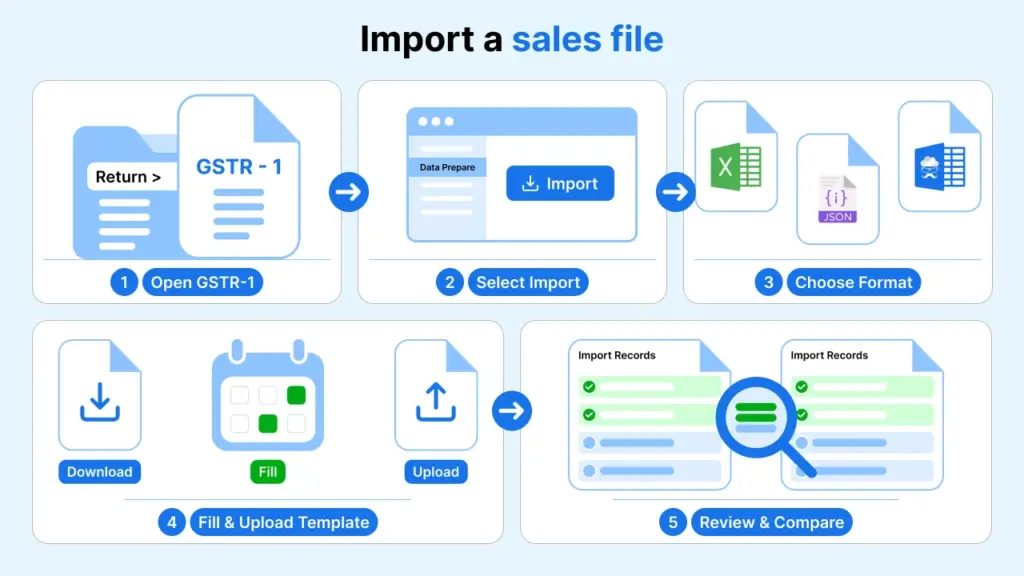
- Open the company’s Return > GSTR-1 screen.
- On Data Prepare, select Import Your Data.
- Choose the relevant format, such as Government Excel/CSV, JSON File or Munim Excel Template.
- For a template import, download the relevant sample, fill it with the business’s records and upload it.
- Review the imported records in Data Prepare and compare them with the source file.
Buying test: Do the imported records agree with the source file, and can the accountant repeat the process independently?
3. Can it identify missing and mismatched purchase records?
The software should compare purchase books with GSTR-2B and highlight records that need attention. This reduces the need to inspect every invoice manually.
The result should show both the difference and the document behind it.
Munim workflow: Reconcile purchases with GSTR-2B
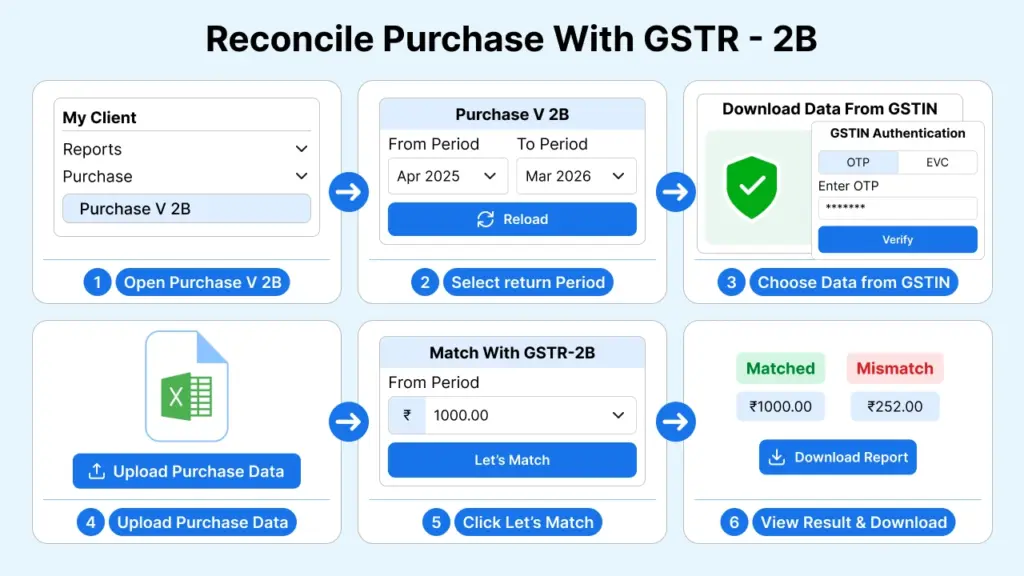
- Open My Clients > Reports > Purchase > Purchase v 2B.
- Select the return period range and click Reload.
- Select Download Data from GSTN and complete the required authentication.
- Use Upload Purchase Data to import the purchase register in Excel.
- Select Let’s Match, review the permitted difference setting and choose Continue to Overview.
- Open View Result in Details to inspect suppliers or documents. Use Download Reports to save the results.
| Munim result | What the accountant should do |
| Exact Match | Continue the separate ITC eligibility review |
| Suggested Match | Verify the possible match before accepting it |
| Mismatched | Check the differing invoice details or values |
| Missing in 2B | Check the period and supplier reporting |
| Missing in PR | Verify the invoice and any missing purchase entry |
The workflow for reconciling GSTR-2B with purchase books shows how these categories guide follow up.
Buying test: Can the team produce a focused list of invoices requiring investigation or supplier follow up?
4. Does it support IMS and relevant GST updates?
The software should support the applicable Invoice Management System process and clearly distinguish local review decisions from actions sent to GSTN.
For an August 2026 evaluation, buyers should check how the product handles the IMS changes effective from October 2025. These include additional pending options for specified documents and facilities relating to ITC reduction and remarks, subject to conditions.
Munim workflow: Review invoices through IMS
- Open My Clients > Return > IMS – Compute GSTR-2B for the required company.
- Choose Compare and Claim, fetch data through Download data from GSTN, and upload purchase records using Upload Data.
- Select Let’s Match and review the matching settings.
- Open View Details to investigate differences, then review document actions in IMS Dashboard.
- Apply the appropriate Accept, Reject or Pending action where permitted. Review any automatically assigned statuses.
- Proceed to Push to GSTN, upload the reviewed actions and check processing status. Use Compute GSTR2B or Compute and Download GSTR2B where applicable.
Buying test: Can the accountant explain what has been reviewed locally and what has actually been updated on the portal?
5. Are summaries, reports and filing status easy to check?
The software should clearly separate prepared data, uploaded data and filed returns. A successful upload does not by itself confirm filing.
| Output to inspect | Why it matters |
| Return summary | Review liability and ITC before filing |
| Reconciliation report | Track differences and unresolved invoices |
| Filing status and acknowledgement | Confirm completion for the correct period |
| Filed return copy | Retain evidence of the return filed |
| Exported reports | Share records with the owner or CA |
Munim workflow: Download filed returns
- Open My Clients, choose the company and select Reports > Download Filed PDF.
- Select the financial year and click Update Status.
- Select the required periods marked Return Filed.
- Click Import From GST Portal to retrieve the available documents.
- Select the retrieved documents and choose Export > Download Selected PDF. Multiple selected PDFs download as a ZIP file.
Buying test: Can the reviewer understand the figures and retrieve evidence of completed filing?
6. Are pricing and support clear before payment?
The best GST return filing software should fit the business’s budget after essential extras are included.
| Item | What to confirm in writing |
| Subscription | Price in rupees and applicable GST |
| Registrations and users | Included limits and additional charges |
| Features | Reconciliation, IMS, reports and annual return coverage |
| Setup | Training, migration and onboarding charges |
| Support | Channels, working hours and escalation process |
| Renewal and exit | Renewal price, refund conditions and data export access |
Pick the software that makes filing easier, not just faster
The best GST return filing software isn’t the one with the longest feature list. It’s the one that works with your data, saves your accountant time every month, and has no surprise costs.
Before you decide, run these 6 checks with one month of your own records:
✔ Supports all your returns
✔ Imports your data without rework
✔ Finds missing and mismatched invoices
✔ Handles IMS and GST updates
✔ Shows clear reports and filing proof
✔ Has clear pricing and support
New to Munim GST? Try these 6 checks in Munim with your own data. [Book a demo →]
Already using Munim GST? Check you’re using 2B reconciliation, IMS and filed return downloads. These are the features that save the most time each month.
Common Questions About GST Return Filing Software
Which is the best GST return filing software for a small business?
The best choice fits the business’s returns, invoice volume, existing records and budget. Munim and other shortlisted products should be tested with the same data before purchase.
How is GST billing software different from GST return filing software?
Billing software helps you create invoices and record sales. Return filing software helps you prepare, check and file your GST returns. Some tools do both, so check which part you actually need.
Can I keep my current accounting software, like Tally?
Yes, in most cases. Check that the GST software can import files from your current software in the format you already use. Test this with a real export during the demo.
If an invoice shows “Exact Match”, can I claim ITC on it?
Not automatically. A match only means your record and your supplier’s record agree. Your accountant still needs to check the other ITC conditions and any reversals.
Can GST software prevent every filing error?
No. Software can identify specified data problems, but the accountant must still review transaction details and tax treatment.
Can I manage multiple GSTINs in one subscription?
It depends on the software and plan. Before paying, ask how many GSTINs and users are included, and what extras cost.
How do I compare the top GST software options?
Run the same test on each one: import the same data, fix the same error and run the same 2B reconciliation. Then compare how much time each took and the total yearly cost, not the feature list.
Do I still need a CA if I use GST software?
Software makes the prep work faster, but a CA or accountant should still review your returns, ITC claims and any notices. Think of software as a tool that saves your CA time, not a replacement.
Can I file GST returns myself using software?
Yes, if your business is simple and you understand your returns. But if you have many purchase invoices, ITC checks or multiple GSTINs, it’s safer to have an accountant review before filing.
Disclaimer: "This blog post is for informational purposes only. For specific tax advice related to your business, please consult a qualified Chartered Accountant or GST practitioner."
About the author

Mehul is a seasoned content writer with a passion for simplifying complex accounting and GST topics. With a keen interest in entrepreneurship and business management, he specializes in creating informative and engaging content for themunim.com. His goal is to help businesses understand and implement accounting and GST software solutions effectively. When he's not crafting content, Mehul enjoys exploring new places and spending time with his Golden Retriever.
Post Tags
Related Articles
Explore the latest market news, useful resources for business, and Munim updates.