
Unit Conversion in Inventory: Buy in Boxes, Sell in Pieces Without Mismatches
 AuthorMehul Jagwani
 Reviewed ByCA Ajay Savani



- What Is Unit Conversion in Inventory?
- Why Do Inventory Mismatches Happen When Purchase and Sales Units Differ?
- How Does Box-to-Piece Conversion Work?
- How Unit Conversion Works in Munim Billing & Accounting
- How Can Existing Munim Billing & Accounting Users Check Unit Conversion in Stock Reports?
- Keep Boxes and Pieces Under the Same Stock Control
- FAQs

Summary:
Unit conversion in inventory helps businesses buy products in boxes and sell them in pieces while maintaining accurate stock quantities. It prevents inventory mismatches by automatically converting purchase and sales units using a predefined conversion ratio.
You purchase 10 boxes from your supplier. Each box contains 20 pieces. During the day, your team sells 37 pieces.
Now comes the problem: should your inventory show boxes, pieces, or both?
For retailers, wholesalers, distributors and accountants managing such stock, manual conversions can quickly create quantity mismatches. Unit conversion in inventory solves this by defining a fixed relationship between two units, such as 1 box = 20 pieces.
At Munim, we use a secondary-unit system so you can purchase an item in one unit, sell it in another and still maintain the correct stock quantity.
What Is Unit Conversion in Inventory?
Unit conversion in inventory means defining a fixed conversion ratio between two units used for the same item.
For example:
1 Box = 10 Pieces
If you purchase 5 boxes, your inventory receives the equivalent of 50 pieces.
If you later sell 20 pieces, the system deducts the equivalent quantity from the same stock instead of treating boxes and pieces as separate products.
This is especially useful when your supplier and customer use different units.
Simplify Your Business Operations
Designed to give you speed, control, and accuracy in daily accounting tasks.
 Save time with automated accounting workflows
- Get 35+ detailed business reports easily
- Access your business anytime, anywhere
 Save time with automated accounting workflows

| Business | Purchase Unit | Sales Unit |
| Grocery store | Carton | Piece |
| Hardware retailer | Box | Piece |
| Stationery shop | Box | Piece |
| Wholesaler | Dozen | Piece |
| Food business | Kg | Gram |
The exact conversion depends on how your supplier packs the product. You should always configure the actual ratio used for that item.
Why Do Inventory Mismatches Happen When Purchase and Sales Units Differ?
The problem usually starts when purchase and sales quantities are recorded independently.
Suppose you purchase:
5 boxes × 10 pieces = 50 pieces
But your purchase entry records only a quantity of 5.
You then sell 20 pieces.
If your system does not understand that one box contains 10 pieces, it may attempt to deduct 20 from a stock quantity of 5. Your inventory records no longer represent the physical stock available.
Manual workarounds create another problem. Someone has to calculate the box-to-piece conversion every time there is a purchase, sale, return or stock adjustment.
One incorrect calculation can affect:
- available stock,
- reorder decisions,
- purchase planning,
- stock valuation,
- sales availability, and
- physical stock reconciliation.
These errors can also result in negative stock in inventory, where recorded sales exceed the available quantity.
A fixed inventory unit conversion removes the need to perform that calculation repeatedly.
How Does Box-to-Piece Conversion Work?
Take a simple example.
You purchase 8 boxes of LED bulbs, and each box contains 12 bulbs.
Your conversion ratio is:
1 Box = 12 Pieces
Your total available quantity is therefore:
8 × 12 = 96 pieces
Now assume you sell 30 individual bulbs.
Your remaining stock becomes:
96 – 30 = 66 pieces
The same inventory can also be understood as:
5 complete boxes + 6 pieces
The important point is that you should not maintain one unrelated stock balance for boxes and another for pieces. Both units represent the same underlying inventory.
With the correct conversion ratio, transactions recorded in either unit can be reflected against one stock balance.
This is an important part of managing inventory efficiently, especially when your business purchases and sells products in different units.
How Unit Conversion Works in Munim Billing & Accounting
In Munim Billing & Accounting, our Secondary Unit feature lets you maintain an item using two units with a defined conversion ratio.
For example, you can configure:
Main Unit: Box
Secondary Unit: PCS
Conversion Ratio: 1 Box = 10 PCS
Munim can then use this relationship when the item is entered in purchase and sales transactions. The secondary-unit feature supports examples such as Box/PCS, Kg/Gram and Dozen/Piece.
Remember the example we discussed at the beginning? You purchased 10 boxes containing 20 pieces each and sold 37 pieces. With the conversion ratio set to 1 box = 20 pieces, your remaining stock is:
(10 × 20) – 37 = 163 pieces
That’s 8 complete boxes + 3 pieces. With Munim’s secondary-unit feature, the purchase and sale quantities are converted using the defined ratio, helping you maintain an accurate stock balance without manual calculations.
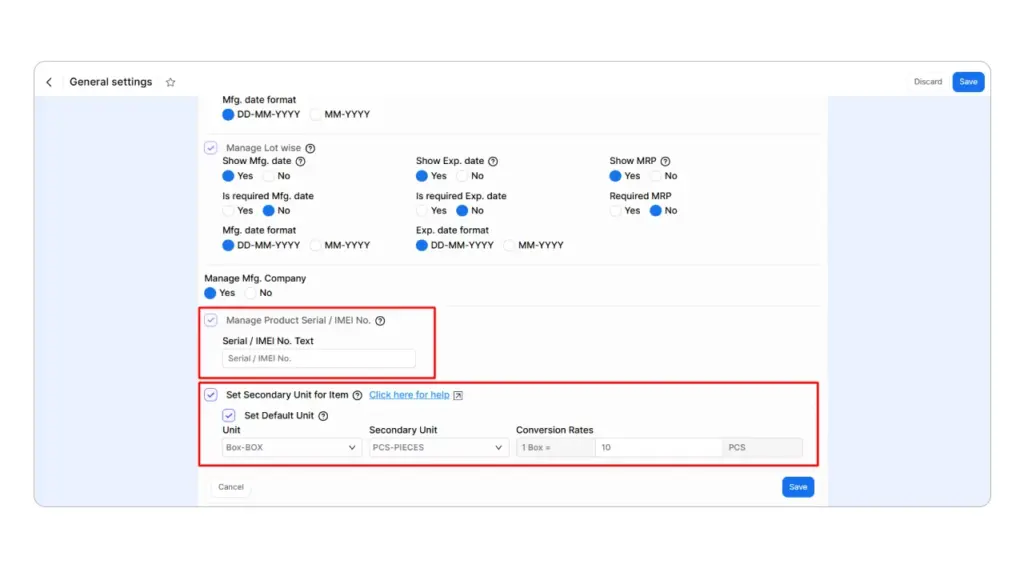
Step 1: Enable the Secondary Unit Feature
Go to:
Settings → General Settings → Inventory
Enable:
Set Secondary Unit for Item
This setting makes the secondary-unit option available while configuring items.
Step 2: Configure the Item and Conversion Rate
Go to:
Masters → Item Master → Item
Create a new item or edit the required item.
Under Inventory & Pricing, configure the relevant unit details. Munim’s Item Master includes fields for the primary unit, secondary unit and conversion rate.
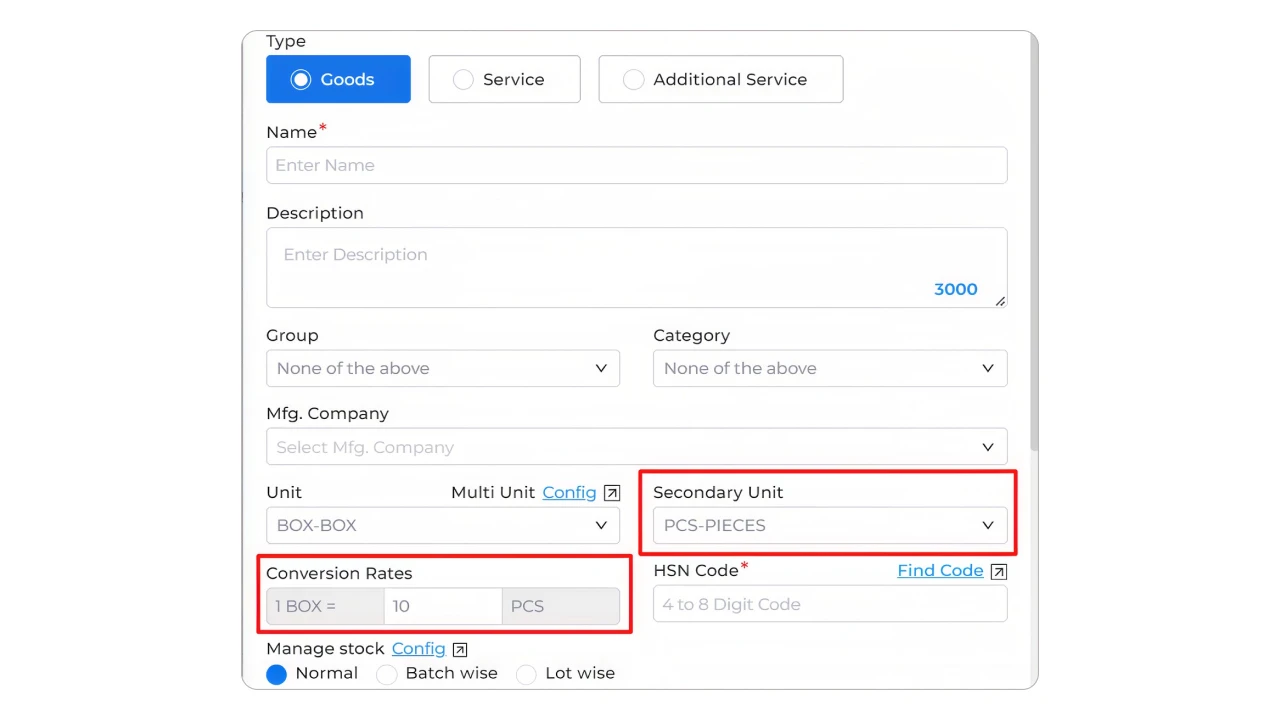
For example:
Item: Mineral Water Bottle
Primary Unit: Box
Secondary Unit: PCS
Conversion: 1 Box = 24 PCS
Make sure you check the conversion rate carefully before recording transactions. A wrong ratio can cause incorrect quantity calculations in future stock movements.
Step 3: Record the Purchase in Boxes
Suppose your supplier sends:
10 Boxes
with:
24 bottles per box
Go to:
Transactions → Purchase → Purchase Bill
Create the purchase bill, select the item and use the applicable unit for the transaction. Munim’s secondary-unit workflow allows either the main or secondary unit to be selected for inventory transactions.
With a ratio of 1 Box = 24 PCS:
10 Boxes = 240 Pieces
Your inventory now represents 240 bottles.
Before recording the purchase, you can also verify the quantity delivered using a Goods Received Note (GRN) to identify any difference between ordered and received stock.
Step 4: Sell the Same Item in Pieces
Now a customer purchases:
15 bottles
Go to:
Transactions → Sales → Sales Invoice
Select the same item and choose the required unit from the Unit option.
Because the conversion ratio has already been defined, Munim uses it when calculating the inventory movement.
Your stock calculation becomes:
240 Pieces – 15 Pieces = 225 Pieces
You do not need to manually calculate how much of a box should be deducted.
How Can Existing Munim Billing & Accounting Users Check Unit Conversion in Stock Reports?
After configuring secondary units, we recommend checking a few transactions before using the setup across your entire inventory.
Go to:
Reports → Item Report → Stock Register Report
Select the item and required date range.
Munim’s Stock Register Report includes Secondary Unit and Secondary Unit Qty columns alongside the main unit, allowing you to review stock movement according to the configured conversion rate.
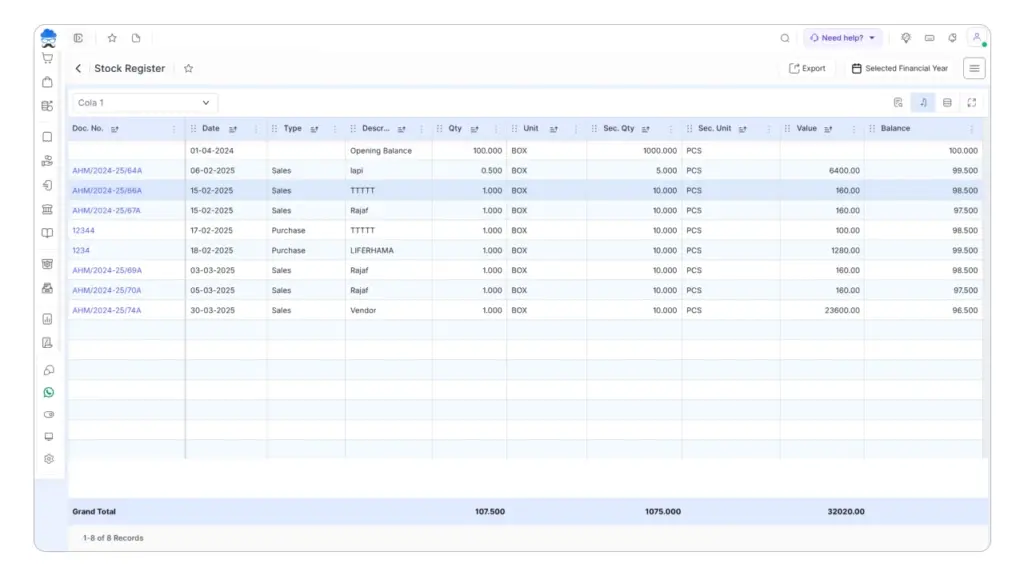
For example, after purchasing 10 boxes and selling 15 pieces, review whether:
- the purchase quantity appears correctly,
- the secondary-unit quantity is calculated correctly,
- the sale has reduced the expected quantity, and
- the closing stock matches your physical inventory.
This small check is useful when you first configure a new conversion ratio.
We also recommend periodic stocktaking and physical inventory checks to identify differences between your recorded stock and the actual quantity available.
Keep Boxes and Pieces Under the Same Stock Control
Buying in bulk and selling in smaller units should not force you to maintain stock manually.
With the right unit conversion in inventory, you can define how your purchase unit relates to your sales unit and keep both transactions connected to the same inventory quantity.
If you’re looking for a simpler way to manage purchases, sales and inventory across different units, explore Munim Billing & Accounting’s inventory management features and manage the conversion as part of your normal billing workflow.
Keep your billing and inventory quantities organised with Munim Billing & Accounting. Start your 7-day free trial.
FAQs
Can I purchase an item in boxes and sell it in pieces?
Yes. If your inventory system supports unit conversion, you can define a fixed ratio such as 1 box = 10 pieces. Purchases and sales can then be recorded using the appropriate unit.
What is a secondary unit in inventory?
A secondary unit is another measurement used for the same item. For example, Box may be the primary unit and PCS the secondary unit, connected through a fixed conversion ratio.
How do I convert boxes into pieces for inventory?
Multiply the number of boxes by the number of pieces in each box. For example, 6 boxes containing 20 pieces each equal 120 pieces.
Does Munim Billing & Accounting support multiple units for the same item?
Munim supports a primary and secondary unit for an item with a defined conversion ratio. You can select the relevant unit while creating supported purchase and sales transactions.
Disclaimer: "This blog post is for informational purposes only. For specific tax advice related to your business, please consult a qualified Chartered Accountant or GST practitioner."
About the author

Mehul is a seasoned content writer with a passion for simplifying complex accounting and GST topics. With a keen interest in entrepreneurship and business management, he specializes in creating informative and engaging content for themunim.com. His goal is to help businesses understand and implement accounting and GST software solutions effectively. When he's not crafting content, Mehul enjoys exploring new places and spending time with his Golden Retriever.
Related Articles
Explore the latest market news, useful resources for business, and Munim updates.