How to Migrate from Excel to Accounting Software Without Losing Data?
 AuthorPriyanka Chaudhari
 Reviewed ByCA Ajay Savani


- How to Migrate from Excel to Accounting Software Without Losing Data?
- What are the Hidden Risks of Managing Accounts in Excel?
- Why are the Reasons to Switch from Excel Data to Accounting Software?
- What is the Ideal Time to Switch From Excel to Accounting Software?
- Which Data Types are Migrated from Excel to the Accounting Platform?
- 5 Tips to Be Considered While Switching from Excel Data to Accounting Software
- Let’s Conclude
- FAQs on Excel Data Migration to Accounting Software
There is no need to pay money on accounting software when you have Excel to handle your money. You have probably already asked this yourself more than once. Although Excel is one of the cheapest methods to record the transactions and financial data, it is highly dependent on manual input, which increases the chances of errors and complicates the process. That is where smart accounting software can be used with automated services, more accurate and real-time information.
However, how about the years of information in Excel? The blog describes how you can safely move your Excel data to an online accounting software without losing any valuable information.
How to Migrate from Excel to Accounting Software Without Losing Data?
Step 1: Highlight What You Need
Highlight why you are migrating from the Excel sheets to the accounting solutions, such as accuracy, automation, insights, security, real-time data, etc.
Step 2: Find the Right Accounting Solution
Once your checklist is final, select an accounting software that best fits your requirements and industry standards.
Step 3: Structure the Existing Data
Review the records in your Excel files, eliminate redundant entries, debug issues, and organize it into a structured format for seamless migration.
Step 4: Data Backup
Before the transition happens, back up your data securely to ensure there’s no data loss in case the migration fails.
Step 5: Align Data Fields
Match the data, like invoices, transactions, client details, vendor information, etc, in your Excel sheet with the fields in the accounting software to eliminate discrepancies due to mismatched data entry.
Step 6: Smart Imports / Pre-defined Templates
Next-gen accounting software provides direct imports for Excel or even offers pre-designed templates. Upload the data into the pre-defined standard format of the platform for a smooth transition.
Step 7: Test the Migration
Instead of importing the entire data, upload the sub-set to check precision, format, and compatibility. This terminates the risks of hidden vulnerabilities amidst data transfer.
Step 8: Data Validation and Reconciliation
Once the data shift is accomplished, authenticate reports, balances, and transactions with the base information in the Excel sheet to ensure 100% accuracy.
Step 9: Team Training
Train your team to use the new accounting system to maximize efficiency and eliminate errors.
Step 10: Track and Maintain
Monitor the efficiency and performance of the new accounting system, fix minor bugs, and leverage advanced features like smart insights, dashboards, reports, automation, etc.
Munim too offers the comfort of seamless data migration to its users through a data import facility. The standard Excel template lets you record all your data in a structured format, enabling seamless migration from Excel to Munim Accounting and billing. Want to know how to go about it? Start reading right away!
What are the Hidden Risks of Managing Accounts in Excel?
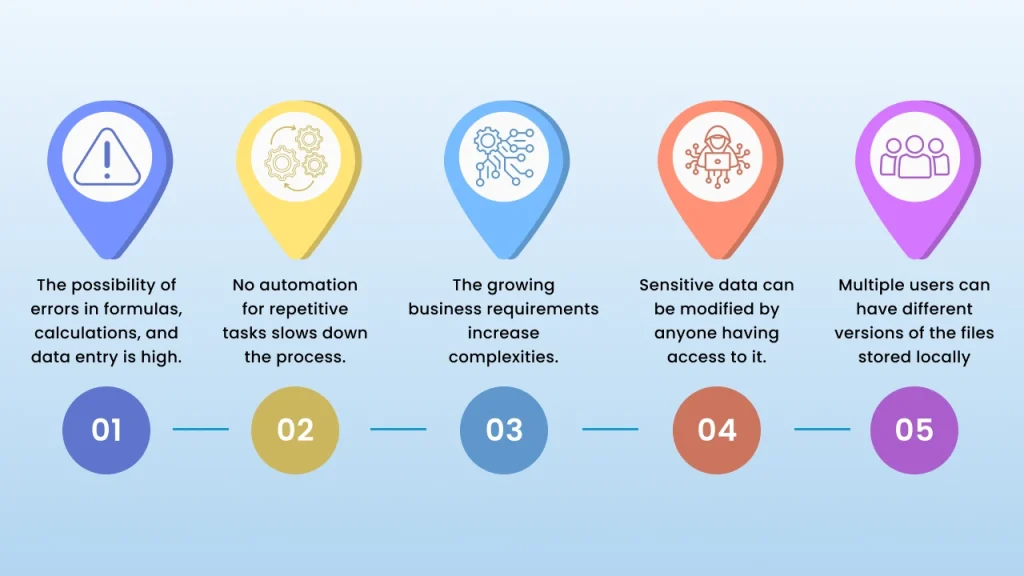
Why are the Reasons to Switch from Excel Data to Accounting Software?
Precision in Computations
Digital accounting platforms automate computations, data entry, and other tasks offering precision in numbers.°
Real-time Insights
Online accounting and billing software present real-time insights into your financial data, which is not possible with Excel.
Regulatory Compliance
The accounting solutions are updated with the latest tax regulations, helping businesses to meet the compliance standards.
Scalability
The cloud-based accounting platforms are highly scalable and support the growing requirements of your businesses without adding complexity.
Remote Collaboration
It opens the doors to boundless access beyond time as well as geographic locations, guaranteeing visibility and a single source of information.
With too many accounting systems in the Market offering automation and real-time insights, Munim goes a step further to offer 100% accuracy, 35+ reports, 360° financial view, 100% data security, and 2X speed. It’s not just a replacement for Excel but is a smart solution that transforms the way businesses manage accounts and comply with tax regulations.
What is the Ideal Time to Switch From Excel to Accounting Software?
Most of us often continue using Excel as we don’t know exactly when to switch. Well, the answer to this is we can switch at any time of the year. However, the ideal time to switch from an Excel sheet to accounting software is during the financial year-end. Want to know the reasons? Here’s why:
- Close your year-end accounts and reconcile data to start the new financial year with fresh, structured, and accurate data.
- Year-end means reviewing financial data; it’s the ideal time to switch without disturbing the mid-year transactions.
- Switching during the year-end ensures meeting compliance standards, which is a bit difficult with Excel.
- Automation in the accounting systems saves time invested in recurring year-end tasks like reconciliation, report preparation, etc.
- Year-end means auditor face-off, generally, they prefer clean and organized reports, thus year-end is the best time to ensure audit-readiness.
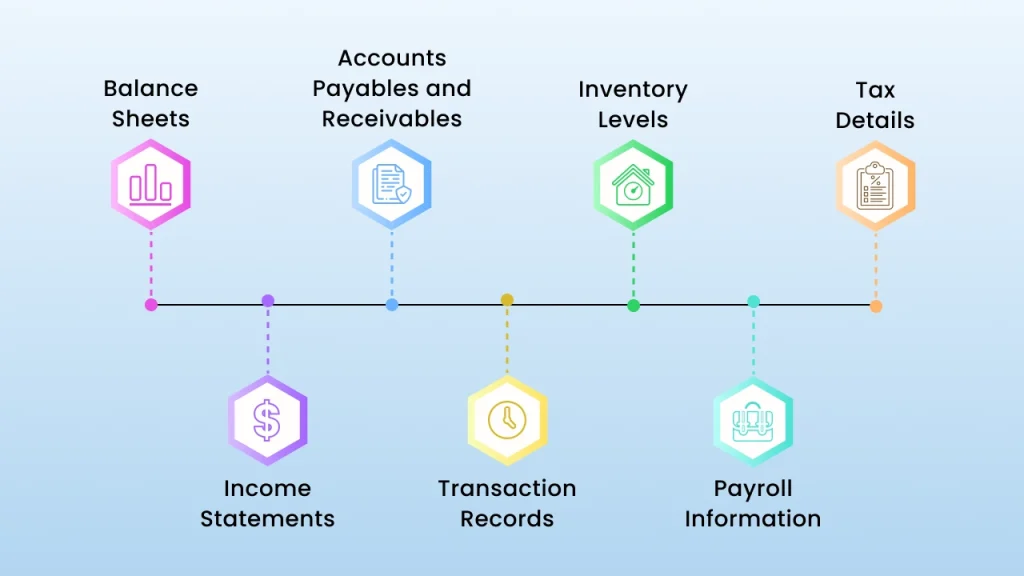
Which Data Types are Migrated from Excel to the Accounting Platform?
5 Tips to Be Considered While Switching from Excel Data to Accounting Software
- Choose the Perfect Time
Year end is often occupied with multiple tax reports, inventories, etc. Choosing year-end, month-end, or quarter-end can be beneficial to switch as automation will streamline all the processes.
- Import Opening Balances
Importing the entire historical data might slow down the accounting software. Instead of uploading the entire log, import opening balances like outstanding invoices, bills payable, etc.
- Error-free Data Prep
Most of the accounting systems have a specific format like character limit, word limit, date format, column headings. etc. Make sure the data you upload is error free and doesn't have typos, mismatched entries, duplicacy, etc.
- Clean Your Records
Before uploading the data to the accounting system make sure you organize it and ensure the format is consistent, accurate customer/ vendor details are added, and there are no errors in inventory reporting.
- Leverage Both Systems
To ensure smooth functioning and transition, leverage both old and new accounting systems simultaneously to avoid complexity.
- Explore New Features
Dedicate some time to the new accounting system and explore new features. Check out the learning material, tutorials, and videos to learn the software.
Let’s Conclude
Excel might look cost-efficient, but is tedious and error-prone. While accounting systems ensure accuracy, transparency, and simplified processes, the transition from Excel can be a bit tedious if not done properly.
Switching from Excel sheets to dedicated accounting software is a mix of perfect timing, a critical execution process, data preparation, testing, and much more. Follow the tips and process mentioned in the blog to avoid data leakage during migration.
If you are planning to migrate from balance sheets to the accounting software, save this blog right away.
FAQs on Excel Data Migration to Accounting Software
Can Excel replace accounting software?
No, Excel cannot replace accounting systems as it lacks automation, transparency, accuracy, security, real-time insights, and more.
Which is better, Excel or an Online accounting solution?
Excel is tedious to manage and involves massive manual work, while accounting systems automate the tasks, simplifying the complex processes. With Excel, your data isn’t secure, but accounting systems provide built-in security for your confidential data. So, accounting systems are much better than Excel.
Can Excel be used as an accounting system?
Microsoft Excel can be used for basic accounting tasks, but for advanced calculations and data, accounting software is the best fit.
Does Munim Accounting and Billing provide seamless data import?
Yes, Munim accounting and billing has a data import facility that provides seamless data upload from Excel and other accounting platforms, eliminating manual entries.
Why is Munim the best choice to switch from Excel to Accounting software?
Munim offers a smooth migration process, round the clock customer support, live chat, scalability to support growing business needs, and built-in security making it the best choice for transition from Excel to accounting software.
What are the common challenges of migrating data from Excel to the Accounting system?
Common challenges of data migration include data corruption, incomplete details, mismatched formats, and the need for manual reconciliation.
How long does it take to migrate data from excel to accounting platform?
The time required for migration completely depends on the amount of data to be transferred. It might range from a few hours to a few days.
How do I prepare Excel Data for Migration?
Clean your data by removing errors, duplicate entries, Outdated data, incorrect information, and mismatched details before migration.
How do I migrate my financial data from Excel to accounting software easily?
To transfer your financial data from excel to accounting software, it is necessary first to clean your excel files and then compare them to the import format of the accounting software. The majority of accounting tools give you an option to directly upload data through any CSV or Excel template, and the process takes no more than a minute and makes no mistakes. Always look through the imported data at least once, to ensure that it is right and then you may start using the software on a regular basis.
Disclaimer: "This blog post is for informational purposes only. For specific tax advice related to your business, please consult a qualified Chartered Accountant or GST practitioner."
About the author
Related Articles
Explore the latest market news, useful resources for business, and Munim updates.