Monthly GST Filing SOP for CA Firms Managing 30, 50 or 100+ Clients
 AuthorMehul Jagwani
 Reviewed ByCA Madhav Bhayani




Summary:
A GST filing checklist for CA firms helps teams manage monthly return filing for 30, 50 or 100+ clients without missing important checks. We recommend starting with sales and purchase data collection, preparing GSTR-1, reviewing GSTR-1A corrections if required, reconciling IMS and GSTR-2B, verifying ITC, preparing GSTR-3B and confirming filing status. Setting internal deadlines before statutory due dates and tracking each client’s progress centrally helps us establish a consistent filing process that reduces last-minute follow-ups.
Managing GST returns for 10 clients is different from handling 50 or 100+ clients every month.
One client hasn’t shared purchase data. Another has GSTR-2B mismatches. A third is waiting for tax payment approval. Before you realise it, the filing deadline is approaching.
For CA firms and GST practitioners, keeping track of every client becomes difficult without a defined process.
That’s why we’ve created this practical GST filing checklist for CA firms. With our suggested monthly workflow, you can organise client data, complete reconciliations and file returns without losing track of pending activities.
Monthly GST Filing Calendar for CA Firms
We recommend setting internal deadlines earlier than the statutory GST filing dates. This gives your team time to collect missing data, resolve mismatches and review returns before filing.
| Timeline | Task |
| 1st–5th | Collect sales and purchase data |
| 6th–10th | Verify invoices and prepare GSTR-1 |
| 11th | File GSTR-1 |
| 12th–14th | Review GSTR-1A corrections and IMS/GSTR-2B |
| 15th–17th | Reconcile ITC and prepare GSTR-3B |
| 18th–19th | Review tax liability and arrange payment |
| 20th | File GSTR-3B and verify filing status |
Button: Download CA Client Management Dashboard
Note: These are our suggested internal timelines for regular monthly filers. The standard statutory due dates are the 11th for GSTR-1 and the 20th for GSTR-3B, unless extended.
Designed for Modern Tax Professionals
A premium filing solution for CAs and tax consultants who need speed, scale, and operational clarity.
 Handle multiple clients with ease
- Reconcile and validate with confidence
- Overcome the limitations of the GST portal
 Handle multiple clients with ease
What About Quarterly GST Filing Clients?
For clients under the QRMP scheme, we recommend maintaining a separate filing calendar because their deadlines differ from monthly filers.
- IFF: Optional filing by the 13th of the following month for the first two months of a quarter.
- PMT-06: Monthly tax payment by the 25th of the following month for the first two months, where payment is required.
- GSTR-1: Quarterly filing by the 13th of the month following the quarter.
- GSTR-3B: Quarterly filing by the 22nd or 24th of the month following the quarter, depending on the state or UT.
We recommend marking clients as Monthly or Quarterly in your tracker to avoid mixing their filing deadlines. Always check the GST Portal for applicable extensions.
GST Filing Checklist for CA Firms: 7 Simple Steps
Step 1: Collect Client Data
We recommend collecting the following details from each client at the beginning of every filing cycle:
- Sales and purchase registers
- Credit and debit notes
- Previous-period adjustments
- Other applicable GST transaction details
Our recommendation: Mark each client as Data Received, Pending or Incomplete to identify who needs a follow-up.
Step 2: Prepare and File GSTR-1
We recommend checking sales invoices against the sales register and verifying GSTINs, tax values and amendments before filing GSTR-1.
Also, review whether any missed or incorrect records require GSTR-1A before filing GSTR-3B.
In Munim GST: Go to My Clients → Return → GSTR-1.
Follow our Prepare → Verify → Upload → File workflow.
Step 3: Review IMS and GSTR-2B
We recommend reviewing supplier invoices through IMS and taking the required Accept, Reject or Pending actions.
Check GSTR-2B after generation and recompute it where required if IMS actions change.
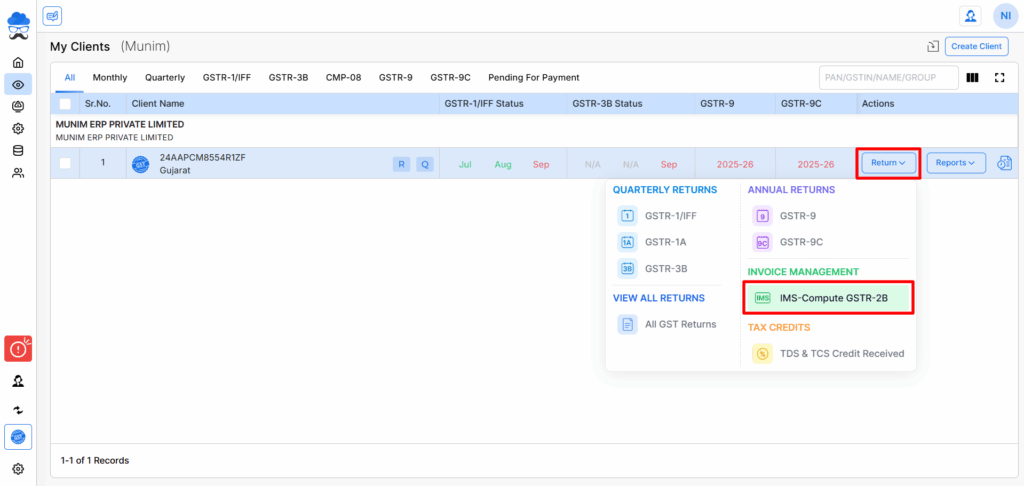
In Munim GST: Go to My Clients → Return → IMS – Compute GSTR-2B.
Step 4: Reconcile Purchase Data With GSTR-2B
Compare your client’s purchase register with GSTR-2B.
We recommend focusing on:
- Exact matches
- Suggested matches
- Mismatched invoices
- Missing invoices
- Ineligible ITC
Resolve differences and verify ITC eligibility before preparing GSTR-3B.
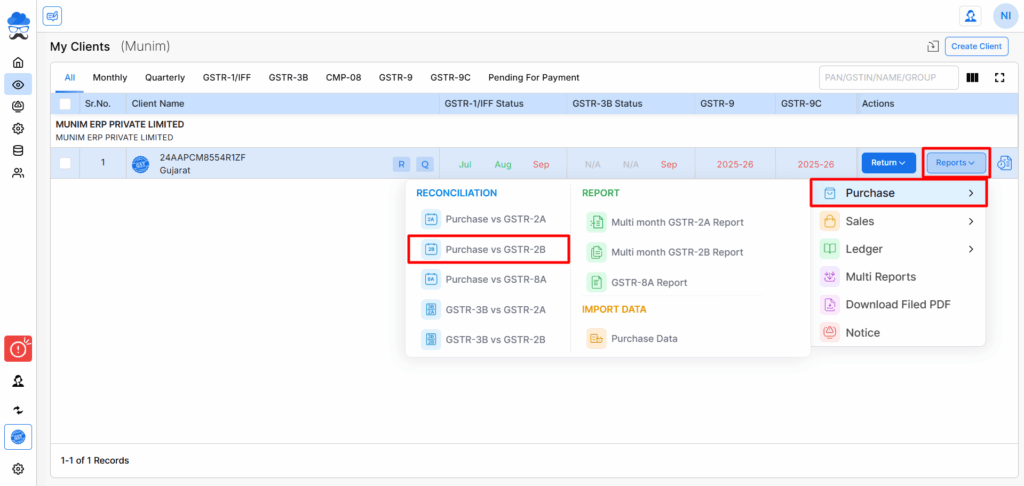
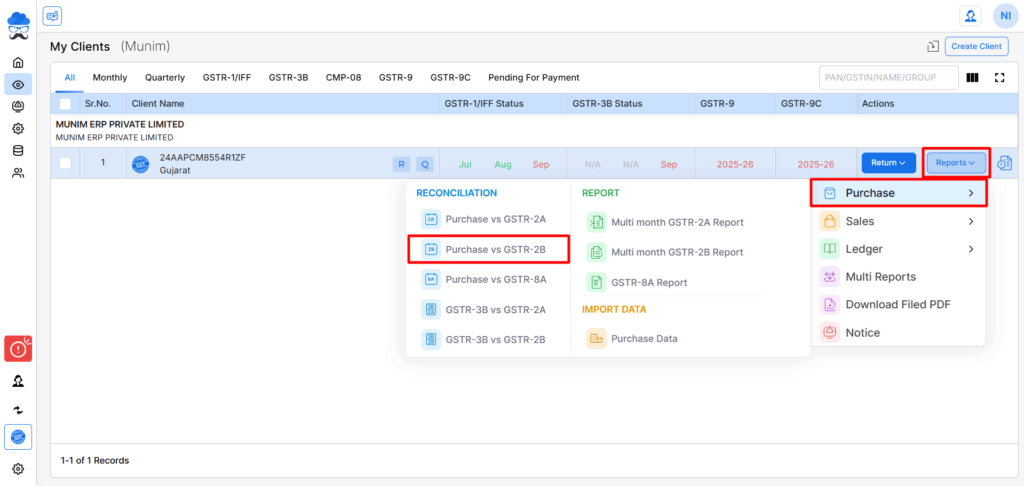
In Munim GST: Go to My Clients → Reports → Purchase → Purchase v 2B.
Step 5: Prepare and Review GSTR-3B
Before filing GSTR-3B, we recommend verifying:
- GSTR-1/1A vs GSTR-3B liability
- GSTR-2B vs proposed ITC
- Reverse-charge liability, where applicable
- ITC reversals and adjustments
- Final tax payable
In Munim GST: Use our GSTR-3B v GSTR-1/1A and GSTR-3B v GSTR-2B reconciliation reports to review differences.
Step 6: Arrange Tax Payment and File GSTR-3B
We recommend sharing the tax payment requirement with your client before the filing deadline.
Once you’ve reviewed the return and completed the payment requirements, proceed with filing.
In Munim GST: Go to My Clients → Return → GSTR-3B.
Review the return, complete the applicable payment steps and file.
Step 7: Verify Filing Status
After filing, confirm that GSTR-1 and GSTR-3B show the correct status on the GST Portal.
We recommend updating your client filing tracker and following up on any pending returns.
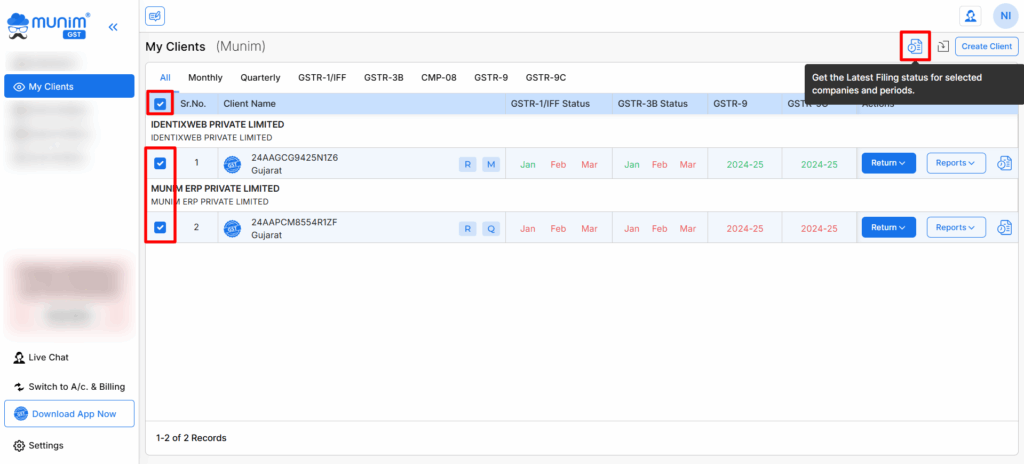
In Munim GST: Go to My Clients, select multiple companies and use Get Filing Status to check filing statuses in bulk.
How to Manage GST Filing for 30, 50 or 100+ Clients
The GST filing process remains the same, but as your client count increases, we recommend improving how you assign tasks, review returns and track progress.
| Client count | Our recommended workflow |
| 30 clients | Maintain a central client checklist and assign filing responsibilities |
| 50 clients | Divide preparation and review responsibilities; track unresolved mismatches |
| 100+ clients | Standardise data collection, prioritise exceptions and use bulk filing-status checks |
We recommend tracking five simple statuses for every client:
Data Pending → Preparation → Review → Ready to File → Filed
Our suggestion is to keep clients with reconciliation issues or pending payments in a separate exception list. This helps your team identify which clients need immediate attention.
Manage Multi-Client GST Filing More Efficiently With Munim
When you’re handling 30, 50 or 100+ clients, the biggest challenge is keeping track of pending work across multiple GSTINs.
With Munim GST, we help your firm simplify the process:
- Check multiple clients’ filing statuses together instead of checking each GSTIN separately.
- Identify purchase mismatches faster through reconciliation reports instead of comparing every invoice manually.
- Review pending IMS actions to identify supplier invoices that need attention.
- Manage GST return preparation and filing through one platform instead of maintaining disconnected workflows.
This helps your team spend less time switching between records and more time resolving client-specific issues before deadlines.
Frequently Asked Questions
What should a CA do if a client submits GST data late?
We recommend following up before the internal cut-off date and marking the client as Data Pending. Once the records arrive, prioritise validation and reconciliation. If the statutory deadline is at risk, inform your client about possible late fees, interest or other applicable consequences.
What if purchase invoices do not match GSTR-2B?
We recommend checking invoice numbers, GSTINs, taxable values and tax amounts. Identify missing or mismatched records, follow up with suppliers where necessary and verify ITC eligibility before claiming credit in GSTR-3B.
How can CA firms track GST filing status for multiple clients?
We recommend maintaining a client-wise filing tracker showing pending, prepared, reviewed and filed returns. With Munim GST, you can select multiple companies under My Clients → Get Filing Status to check their return filing statuses in bulk.
Disclaimer: "This blog post is for informational purposes only. For specific tax advice related to your business, please consult a qualified Chartered Accountant or GST practitioner."
About the author

Mehul is a seasoned content writer with a passion for simplifying complex accounting and GST topics. With a keen interest in entrepreneurship and business management, he specializes in creating informative and engaging content for themunim.com. His goal is to help businesses understand and implement accounting and GST software solutions effectively. When he's not crafting content, Mehul enjoys exploring new places and spending time with his Golden Retriever.
Related Articles
Explore the latest market news, useful resources for business, and Munim updates.