
Stock Adjustment vs Sales Return vs Purchase Return: Which Entry Should You Use?
 AuthorMehul Jagwani
 Reviewed ByCA Ajay Savani



- Stock Adjustment vs Sales Return vs Purchase Return: Quick Decision Table
- What Is a Stock Adjustment?
- When Should You Use a Sales Return?
- When Should You Use a Purchase Return?
- Stock Adjustment vs Sales Return: What Actually Changes?
- Practical Examples: Which Entry Should You Select?
- How to Record These Transactions in Munim
- Choose the Right Entry for Every Stock Change
- Manage Stock Adjustments and Returns With Munim
- Frequently Asked Questions (FAQs)

Summary:
Stock adjustment vs sales return comes down to why your stock changed. Use a stock adjustment when physical inventory differs from your recorded stock because of damage, wastage, consumption or another stock discrepancy. Use a sales return when a customer sends goods back against an earlier sale. Use a purchase return when you return purchased goods to a supplier.
You find five damaged items during a warehouse check. A customer returns another three items from last week’s invoice. At the same time, you need to send four defective units back to your supplier.
All three situations change inventory, but they should not be recorded using the same transaction.
For retailers, wholesalers, manufacturers and accountants, choosing the wrong entry can make your stock records harder to reconcile and may also affect customer, supplier and GST records. In this guide, we’ll explain stock adjustment vs sales return, where purchase returns fit in, and which Munim workflow you should use for common stock situations.
Stock Adjustment vs Sales Return vs Purchase Return: Quick Decision Table
Start with one question: Why did the stock quantity change?
| Situation | Entry to Use | Why |
| Physical stock is different from system stock | Stock Adjustment | You are correcting an inventory difference |
| Goods are damaged or wasted in your warehouse | Stock Adjustment – Wastage | No customer or supplier return is involved |
| Goods are consumed internally | Stock Adjustment – Consume | Stock has been used rather than sold |
| Physical stock is higher than recorded stock | Stock Adjustment | You need to reconcile system stock with physical stock after checking the cause |
| Customer returns goods from an earlier sale | Sales Return | The return relates to a customer and original sales transaction |
| Customer returns goods that are no longer saleable | Sales Return, then Stock Adjustment if required | First record the customer return; then account for unusable stock separately |
| You return purchased goods to your supplier | Purchase Return | The transaction relates to a vendor and original purchase |
| Supplier sends damaged goods and you return them | Purchase Return | The goods are going back to the supplier |
| Goods become damaged after you accepted them and you are not returning them | Stock Adjustment – Wastage | The loss now belongs to your inventory rather than a supplier return |
The easiest rule to remember is:
Customer involved → Sales Return.
Supplier involved → Purchase Return.
Only your physical stock changes → Stock Adjustment.
What Is a Stock Adjustment?
A stock adjustment is used when the quantity physically available in your business does not match the quantity recorded in your inventory system. These differences are often identified during the stocktaking process.
In Munim, the Stock Adjustment module can be used for normal quantity corrections, wastage and internal consumption. It shows the stock recorded in the system alongside the physical quantity so you can reconcile the difference.
Common situations include:
- damaged or broken inventory;
- expired or spoiled goods;
- stock lost or found during physical verification;
- internal consumption of inventory;
- quantity differences discovered during stocktaking.
For example, suppose Munim shows 100 units, but you physically count only 96 units because four units were damaged in storage.
You should not create a sales return because no customer returned those four units. You should not create a purchase return because they are not being sent back to the supplier.
This is a stock adjustment, and the damaged quantity can be recorded as wastage.
When Should You Use a Sales Return?
Use a sales return when a customer returns goods that were previously sold to them.
In Munim, the Sales Return module is used to create a credit note. You can select the customer, choose the reason for the return, locate the relevant sales invoice and select the returned items. Quantity, rate and discount details can then be entered for the return.
For example:
You sell 20 office chairs to a customer.
The customer later returns 2 chairs because they ordered the wrong model.
This is not simply a stock correction. The return is connected to:
- a customer;
- an earlier sales invoice;
- the value of the transaction;
- the returned quantity;
- potentially GST treatment.
Therefore, you should create a Sales Return, not manually increase inventory through Stock Adjustment.
What If the Customer Returns Damaged Goods?
This is where businesses often confuse sales return with stock adjustment.
Suppose a customer returns three items from an earlier sale:
- two items are in good condition;
- one item is damaged and cannot be sold again.
The customer transaction still needs to be recorded correctly, so you should first create the relevant Sales Return.
If the damaged unit subsequently needs to be removed from usable inventory, record that physical loss separately using Stock Adjustment → Wastage Qty, as applicable to your stock process.
This keeps two different events separate:
Event 1: The customer returned the goods.
Event 2: Part of the returned stock is unusable.
Trying to represent both events with only a stock adjustment can leave the customer-facing transaction disconnected from the inventory correction.
When Should You Use a Purchase Return?
Use a purchase return when goods purchased from a supplier are being returned to that supplier.
Examples include:
- the supplier sent the wrong product;
- goods arrived damaged and you are sending them back;
- excess quantity was supplied;
- products did not meet agreed specifications.
Before recording a purchase return, you can compare the delivered quantity and condition with your goods received note (GRN) to identify any discrepancies.
Suppose you purchase 50 units from a vendor and discover that six are defective. The vendor agrees to take those six units back.
Because the goods are being returned against a supplier purchase, use a Purchase Return rather than Stock Adjustment.
In Munim, you can select the vendor, choose the relevant purchase bill and items, and enter the return quantity, rate or discount. We provide this workflow under Purchase Return (Debit Note). To understand the difference between these documents, read our guide on the difference between debit note and credit note.
Stock Adjustment vs Sales Return: What Actually Changes?
Although all three entries affect inventory, their impact on sales, purchases, customer balances, supplier payments and GST is different.
| Impact | Stock Adjustment | Sales Return | Purchase Return |
| Stock quantity | Increases or decreases | Usually increases | Decreases |
| Sales value | No change | Decreases | No change |
| Purchase value | No change | No change | Decreases |
| Customer balance | No change | Reduces receivable or creates a refund/credit | No change |
| Supplier payable | No change | No change | Decreases or creates supplier credit |
| GST impact | No direct sales/purchase GST adjustment; ITC reversal may apply | Output GST liability may decrease | ITC may need to be reversed |
| Accounting impact | Changes inventory value; wastage may be recorded as an expense or loss | Reduces net sales and customer dues | Reduces net purchases and supplier dues |
| Munim module | Inventory → Stock Adjustment | Sales → Sales Return | Purchase → Purchase Return |
Why does this matter?
Suppose a customer returns goods worth ₹5,000. If you record only a stock adjustment, your inventory quantity may become correct, but your sales value and customer balance will remain unchanged.
Similarly, recording a supplier return as a stock adjustment may leave your purchase and supplier payable records incorrect.
That’s why we recommend choosing the entry based on the transaction, not just the change in stock quantity.
GST note: Changes to output GST liability and ITC depend on the applicable GST credit note, eligibility and reversal requirements. A stock write-off may also require ITC reversal, particularly for goods lost, destroyed or written off under Section 17(5)(h) of the CGST Act.
Practical Examples: Which Entry Should You Select?
Example 1: Goods Damaged Inside Your Warehouse
You have 200 bottles in your system. During stocktaking, you find that five bottles broke while being stored.
Use: Stock Adjustment → Wastage
There is no customer return and nothing is being returned to your supplier.
Example 2: Customer Returns Goods
You sold 10 units to a customer, who later returned two units.
Use: Sales Return
The transaction belongs to an earlier sale, so record it against the relevant customer and invoice instead of manually adding two units through stock adjustment.
Example 3: Customer Returns an Unusable Product
A customer returns two units. One can be sold again, but the other is physically damaged.
Use: Sales Return for the customer-facing return.
If the damaged item then needs to be removed from saleable inventory, record the wastage separately through Stock Adjustment.
This gives you a clearer record of why the customer transaction changed and why part of your physical inventory was written off.
Example 4: Damaged Goods Are Returned to the Supplier
You receive 100 units from your vendor. Eight are damaged, and the supplier asks you to send them back.
Use: Purchase Return
The quantity is leaving your stock because the original purchase is being partially returned.
How to Record These Transactions in Munim
For existing Munim Billing & Accounting users, the correct module depends on the reason behind the stock movement.
1. Record a Stock Adjustment
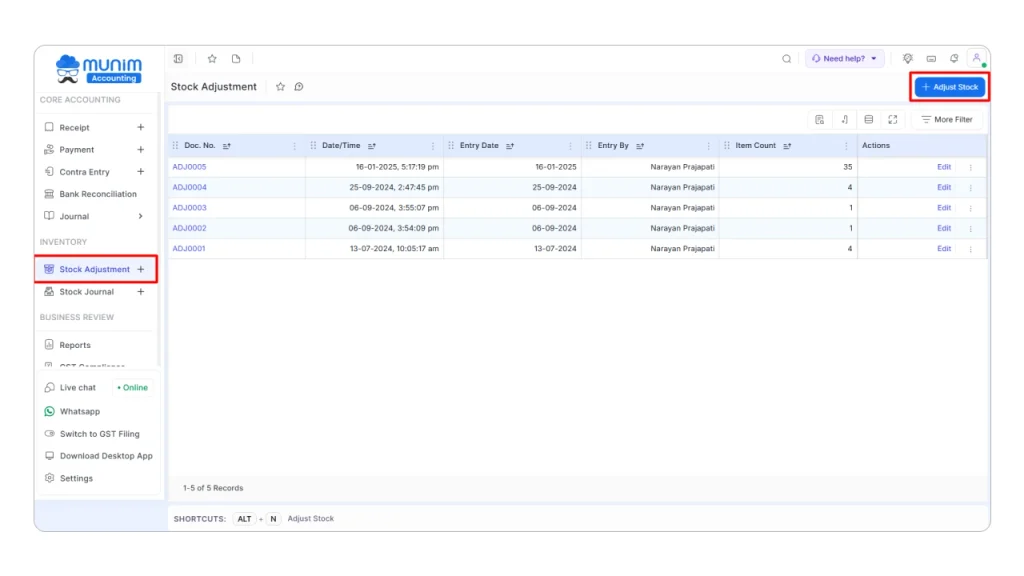
Go to:
Inventory → Stock Adjustment
Then:
- Select the relevant entry date and location.
- Search for the item.
- Review the computer stock.
- Enter or verify the physical stock.
- Review the displayed variation.
- Use Adjust Qty, Wastage Qty or Consume Qty according to the reason for the difference.
- Review the entry before saving.
In Munim, we provide Wastage Qty to record damaged or wasted stock and Consume Qty for items used internally.
2. Record a Customer Return
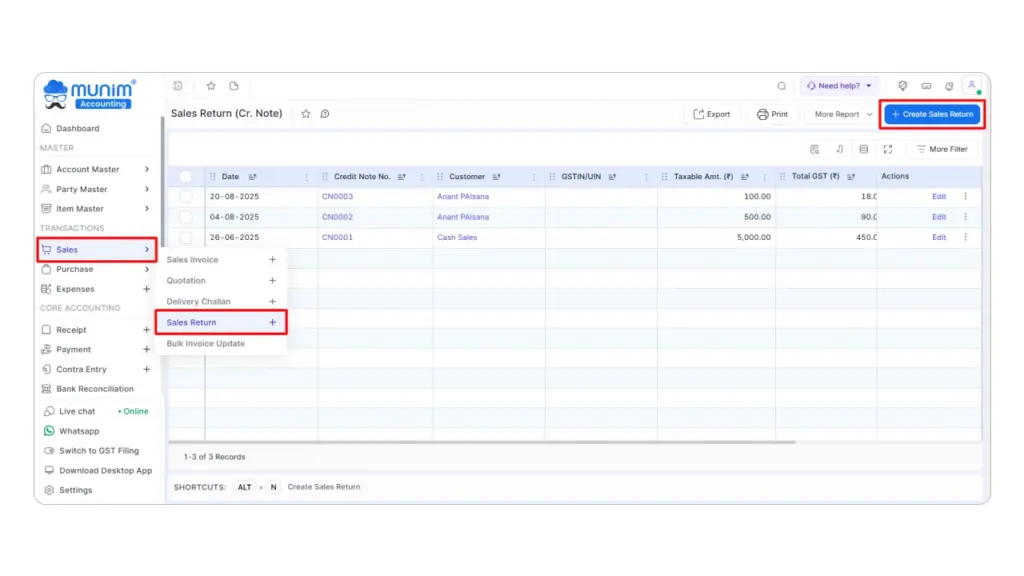
Go to:
Sales → Sales Return → Create Sales Return
Then:
- Select the customer.
- Enter the credit note date.
- Select the appropriate reason.
- Choose the relevant sales invoice.
- Select the returned item or items.
- Enter the return quantity and verify the rate and discount.
- Review the transaction and save it.
You can also create a Sales Return directly from the actions available against a Sales Invoice in Munim.
3. Record a Supplier Return
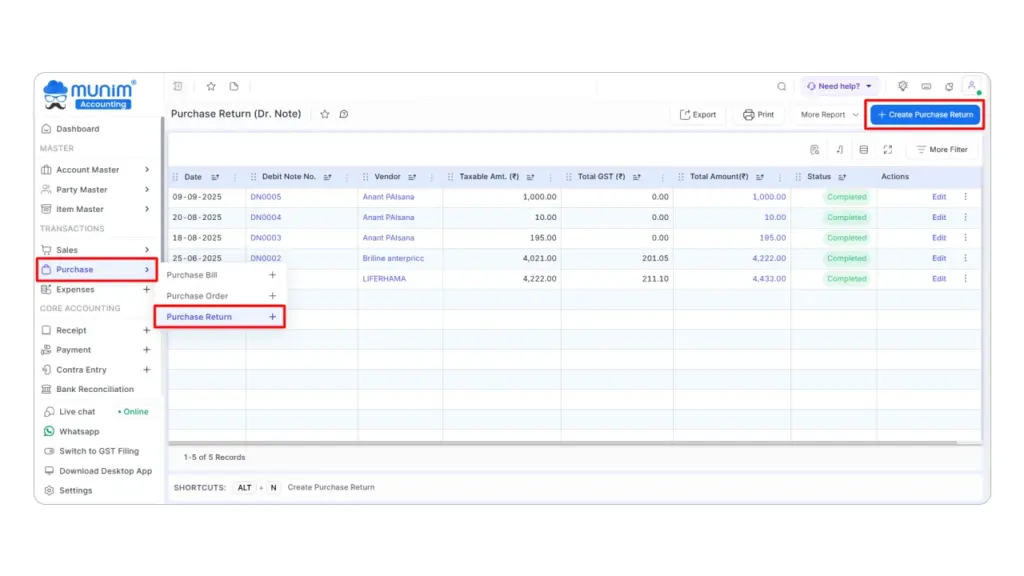
Go to:
Purchase → Purchase Return → Create Purchase Return
Then:
- Select the vendor.
- Choose the reason for the return.
- Select the relevant purchase bill.
- Select the items being returned.
- Enter or verify the quantity, rate and discount.
- Review the return before saving.
A Purchase Return can also be initiated from the relevant Purchase Bill actions in Munim.
Choose the Right Entry for Every Stock Change
Before recording a transaction, remember this simple rule: Customer return → Sales Return, Supplier return → Purchase Return, and Physical stock difference → Stock Adjustment.
Choosing the correct entry helps you keep inventory quantities, customer and supplier balances, and accounting records accurate. We recommend checking the reason behind every stock change before saving the transaction, especially when damaged goods or returns are involved.
Manage Stock Adjustments and Returns With Munim
Record stock adjustments, sales returns and purchase returns through their respective workflows in Munim Billing & Accounting. Keep your inventory and accounts organised with our 7-day free trial.
Frequently Asked Questions (FAQs)
1. Can I use stock adjustment instead of a sales return?
No. If a customer returns goods against an earlier sale, use a sales return to record the transaction. Stock adjustment is meant for physical inventory differences, wastage or internal consumption, not customer returns.
2. What happens if I record a sales return as a stock adjustment?
Your stock quantity may change, but the customer return will not be properly linked to the original sales transaction. This can create differences in customer accounts, sales records and GST reporting.
3. Should damaged goods be recorded as a purchase return or stock adjustment?
If you return damaged goods to the supplier, use a purchase return. If the goods are damaged in your warehouse and are not being returned, use stock adjustment to record the wastage.
4. Can I record stock adjustment, sales return and purchase return in Munim?
Yes. Munim Billing & Accounting provides separate workflows for all three transactions. You can use Inventory → Stock Adjustment for quantity corrections, Sales → Sales Return for customer returns and Purchase → Purchase Return for supplier returns.
Disclaimer: "This blog post is for informational purposes only. For specific tax advice related to your business, please consult a qualified Chartered Accountant or GST practitioner."
About the author

Mehul is a seasoned content writer with a passion for simplifying complex accounting and GST topics. With a keen interest in entrepreneurship and business management, he specializes in creating informative and engaging content for themunim.com. His goal is to help businesses understand and implement accounting and GST software solutions effectively. When he's not crafting content, Mehul enjoys exploring new places and spending time with his Golden Retriever.
Related Articles
Explore the latest market news, useful resources for business, and Munim updates.