
 3941 views
 Overview
Munim allows you to upload and display your company signature on invoice prints. Adding a signature helps create a professional appearance and can be used to authorize printed invoices.
The uploaded signature will automatically appear on supported invoice print templates.
Why Add a Company Signature?
Adding a company signature helps you:
- Create professionally authorized invoices
- Improve document authenticity
- Reduce the need for manual signing
- Maintain consistent branding across printed documents
Add a Company Signature
Step 1: Open Company Settings
- Go to Settings.
- Click on Company.
Step 2: Edit Company Information
- Open the company details page.
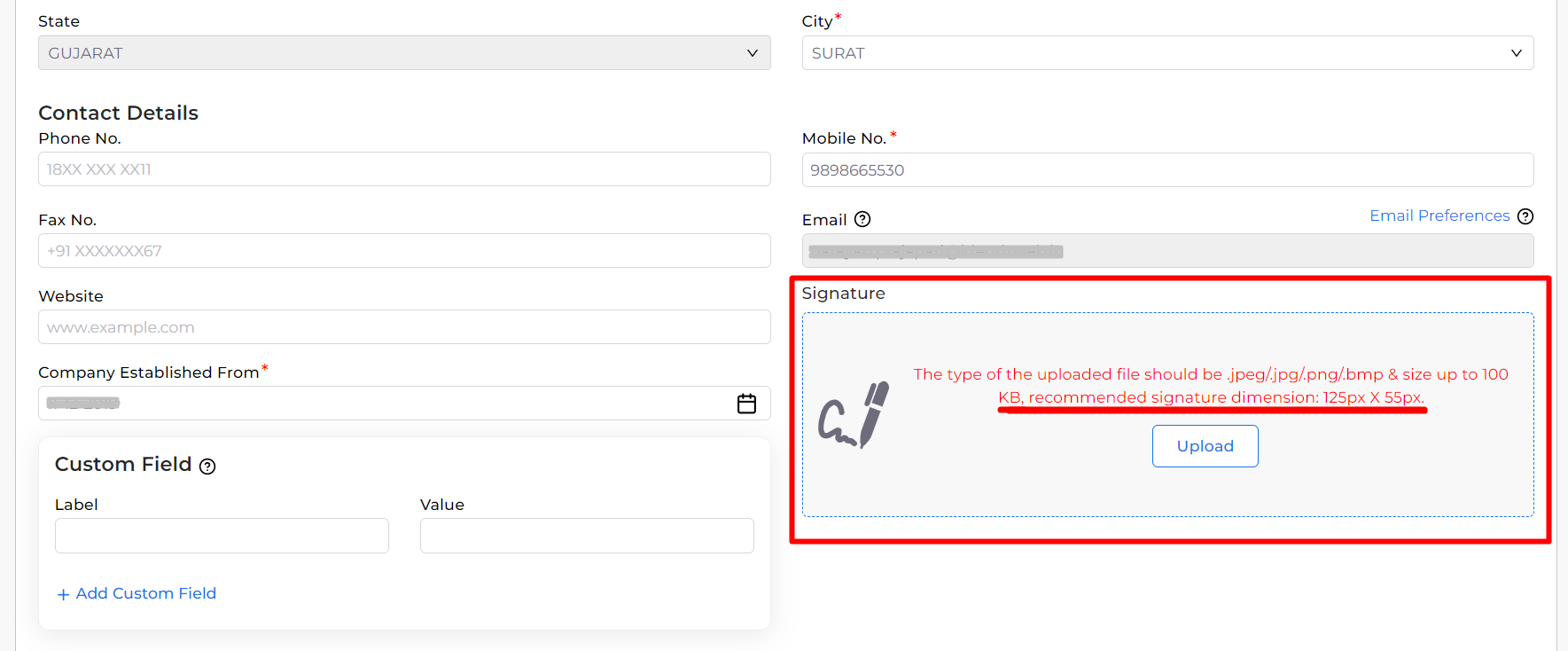
- Scroll to the Signature section.
Step 3: Upload the Signature
- Click the Upload button.
- Select the signature image from your device.
- Upload the file according to the supported requirements.
Supported Formats:
- JPG
- JPEG
- PNG
- BMP
Maximum File Size:
- 100 KB
Recommended Signature Size:
- 125 × 55 pixels
+−⟲
Step 4: Save the Changes
- Verify that the signature has been uploaded successfully.
- Click Save to update the company information.
The uploaded signature will now be available for invoice printing.
How the Signature Appears on Invoice Prints
After saving the company signature:
- The signature is displayed in the authorized signatory section of the invoice.
- Printed invoices look more professional and complete.
- The signature is automatically printed whenever the selected invoice template supports it.
Important Notes
- Use a clear signature image with a transparent or clean background for better print quality.
- Keep the image within the recommended dimensions for optimal display.
- Large images may affect print alignment and appearance.
- Changes will be reflected in invoice prints after saving the company settings.
Result
Your company signature will be displayed on invoice prints, helping create professional and authorized business documents.
Need Assistance?
For any assistance related to company settings or invoice printing, please contact the support team.


