
 3910 views
 Overview
The Place of Supply determines the state in which a GST transaction is considered to take place. It plays an important role in calculating the correct GST type and ensuring GST compliance.
Based on the Place of Supply, the software determines whether:
- CGST & SGST should be applied (Intra-state transaction)
- IGST should be applied (Inter-state transaction)
Why is Place of Supply Important?
The Place of Supply helps determine:
- The applicable GST type
- The state entitled to receive GST revenue
- Whether a transaction is intra-state or inter-state
- Correct tax calculation on invoices
Add Place of Supply in a Sales Invoice
Step 1: Open Sales Invoice
- Go to the Sales Invoice module.
- Click Create Invoice or press Alt + N.
- Select the customer for whom the invoice is being created.
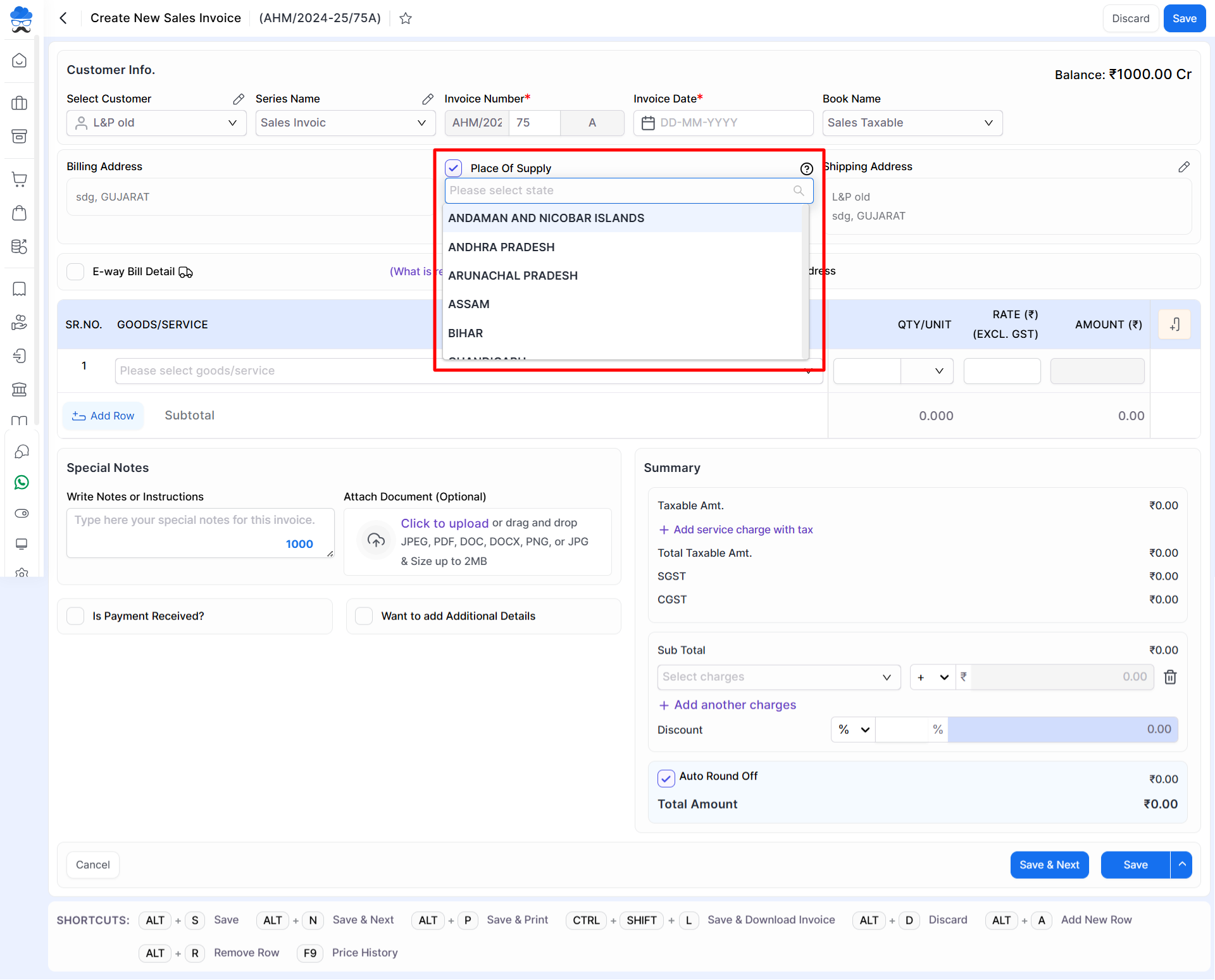
Step 2: Select Place of Supply
- Locate the Place of Supply option on the invoice screen.
- Enable the Place of Supply checkbox.
- Select the required state from the dropdown list.
- Continue entering the remaining invoice details.
How GST is Calculated Based on Place of Supply
Example 1: Intra-State Sale
Seller: Surat, Gujarat
Buyer: Vadodara, Gujarat
Since both parties are located in the same state, Gujarat:
- Place of Supply = Gujarat
- CGST will be charged
- SGST will be charged
GST Applied
CGST + SGST
Example 2: Inter-State Sale
Seller: Surat, Gujarat
Buyer: Mumbai, Maharashtra
Since the seller and buyer are located in different states:
- Place of Supply = Maharashtra
- IGST will be charged
GST Applied
IGST
Example 3: Bill To–Ship To Transaction
Buyer: Lucknow, Uttar Pradesh
Seller: Surat, Gujarat
Delivery Address: Vadodara, Gujarat
In a Bill To–Ship To transaction, the Place of Supply is determined based on GST provisions.
- Buyer Location = Uttar Pradesh
- Seller Location = Gujarat
- Place of Supply = Uttar Pradesh
GST Applied
IGST
Important Notes
- Always verify the Place of Supply before saving the invoice.
- Incorrect Place of Supply may result in incorrect GST calculation.
- The selected state directly affects whether CGST/SGST or IGST is applied.
- Place of Supply should be selected according to GST regulations applicable to the transaction.
Result
The invoice is generated with the correct GST calculation based on the selected Place of Supply.
Need Assistance?
For any assistance related to Place of Supply, please contact the support team.


